Python Django Project – To Do List
We offer you a brighter future with FREE online courses - Start Now!!
The To-Do List application is a web-based platform developed using Django, a Python web framework. This application allows users to create, manage, and delete tasks in a structured manner. The primary goal of this project is to provide a user-friendly interface for task management, with functions like adding new tasks, marking tasks as complete, and removing completed tasks.
About Django To Do List Project
The To-Do List application is a web-based platform built using the Django framework, designed to simplify task management with a user-friendly interface. It offers features like adding new tasks, marking them as complete, and deleting them, which help users organize their daily activities efficiently. The application is built on Django’s Model-View-Template (MVT) architecture for efficient data management, with SQLite handling database operations in the backend. HTML, CSS, and JavaScript enhance the frontend, ensuring a responsive user experience. This project helps individuals stay organized and provides a flexible solution that can be used in different work environments, enhancing overall task management efficiency.
Technology Stack
- Django
- SQLite (default database)
- HTML
- CSS
- JavaScript
- Font Awesome for icons.
Prerequisites for Django To Do List App
- IDE – Visual Studio Code
- Python
- Django Framework
- Web Browser
- The user should have a good understanding of the above topics
Download Django To Do List Project
Please download the source code of the Django To Do List Project: Django To Do List Project Code.
Step-by-Step Code Implementation of Django To Do List
Installing Django
pip install django
This command uses python installer pip to install Django for the development of the To Do List application.
Create Django project
django-admin startproject todoproject
This command initializes a new Django project named todoproject. The startproject command creates a new directory with the project name.
Create an app within the project.
python3 manage.py startapp todo
This command initializes a new Django app named todo in the same directory. It sets up the basic structure for the projects.
Create models.py in the todo app directory.
from django.db import models


class Task(models.Model):
    title = models.CharField(max_length=200)
    description = models.TextField(blank=True)
    completed = models.BooleanField(default=False)
    created_at = models.DateTimeField(auto_now_add=True)


def __str__(self):
    return self.title
In models.py file within the todo app directory, the Task model is defined. Each model maps to a single database table.
- title: character field for the task’s title.
- description: optional text field for the task’s description.
- completed: boolean field indicating whether the task has been completed.
- created_at: datetime field automatically set to the current date and time
Apply database migrations
python3 manage.py makemigrations
python3 manage.py migrate
- makemigrations: Makes migrations based on the changes detected in the models. Migrations are how Django stores changes to the models (and thus the database schema).
- migrate: This command applies the migrations to the database, creating the tables and columns.
Create a views .py
from django.shortcuts import render, redirect
from django.shortcuts import get_object_or_404
from .models import Task


def index(request):
   tasks = Task.objects.all()
   return render(request, 'todo/index.html', {'tasks': tasks})


def add_task(request):
   if request.method == 'POST':
       title = request.POST.get('title')
       description = request.POST.get('description')
       Task.objects.create(title=title, description=description)
       return redirect('index')
   return render(request, 'todo/add_task.html')


def complete_task(request, task_id):
   task = Task.objects.get(id=task_id)
   task.completed = True
   task.save()
   return redirect('index')


def delete_task(request, task_id):
   task = get_object_or_404(Task, id=task_id)
   task.delete()
   return redirect('index')
- index: Retrieves all tasks from the database and renders them in the index.html template.
- add_task: Handles the form submission to add a new task.
- complete_task: Marks a specified task as complete. It retrieves the task by ID and sets its completed field to True.
- delete_task: Deletes a specified task. It retrieves the task by its ID and deletes it.
Now, create Templates.py, which you use to create index.html and add_task.html pages.
index.html
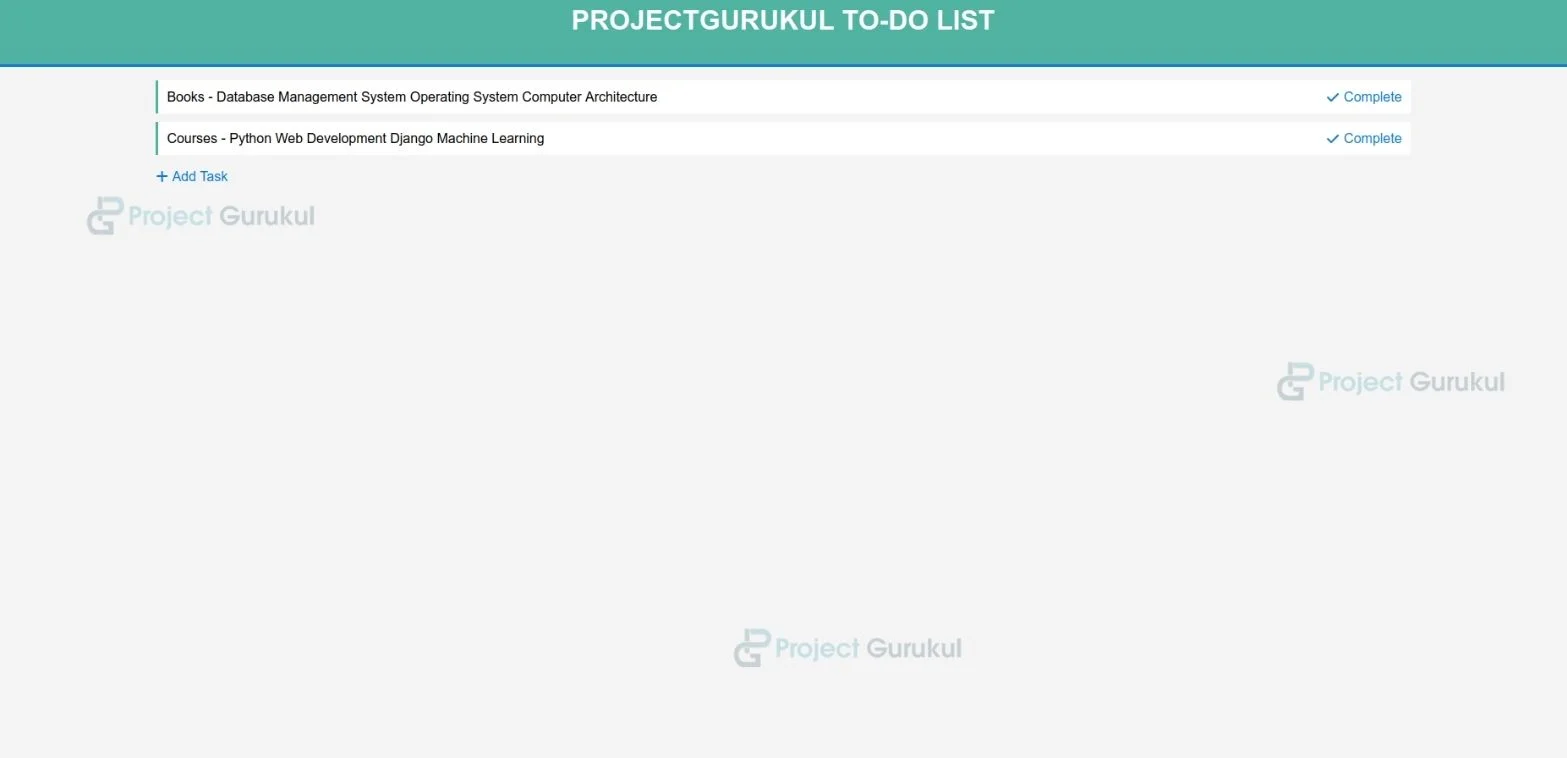
- This code segment uses local CSS and Font Awesome for styling and icons.
- It iterates over all the tasks to display their titles, descriptions, and completion status.
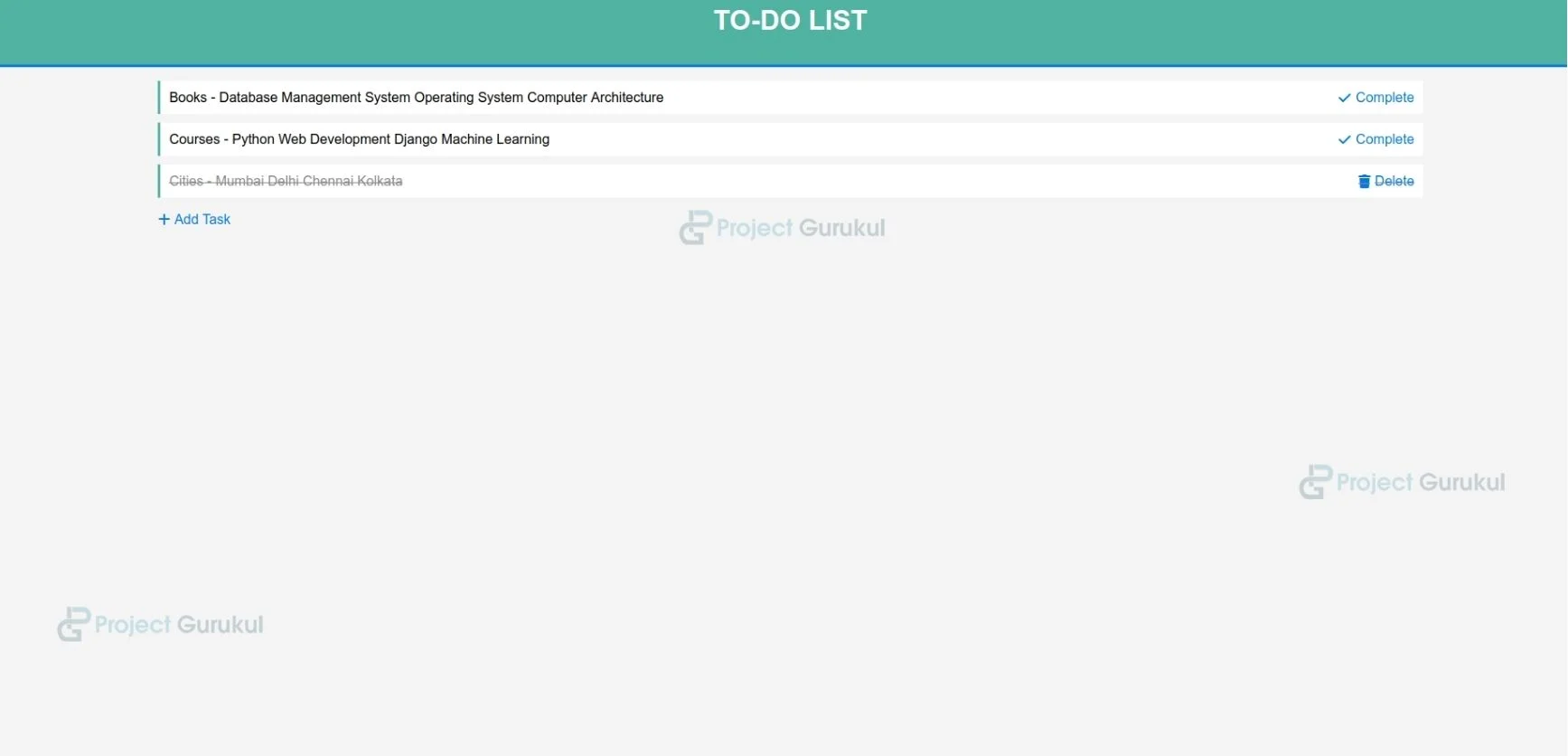
- This allows us to link with completed or deleted tasks, and it also helps to add new tasks.
{% load static %}
<!DOCTYPE html>
<html>
<head>
   <title>To-Do List</title>
   <link rel="stylesheet" type="text/css" href="{% static 'todo/styles.css' %}">
   <link rel="stylesheet" href="https://cdnjs.cloudflare.com/ajax/libs/font-awesome/6.0.0-beta3/css/all.min.css">
</head>
<body>
   <header>
       <h1>To-Do List</h1>
   </header>
   <div class="container">
       <ul>
           {% for task in tasks %}
               <li class="{% if task.completed %}completed{% endif %}">
                   {{ task.title }} - {{ task.description }}
                   {% if not task.completed %}
                       <a href="{% url 'complete_task' task.id %}"><i class="fas fa-check"></i> Complete</a>
                   {% else %}
                       <a href="{% url 'delete_task' task.id %}"><i class="fas fa-trash"></i> Delete</a>
                   {% endif %}
               </li>
           {% endfor %}
       </ul>
       <a href="{% url 'add_task' %}"><i class="fas fa-plus"></i> Add Task</a>
   </div>
</body>
</html>
add_task.html
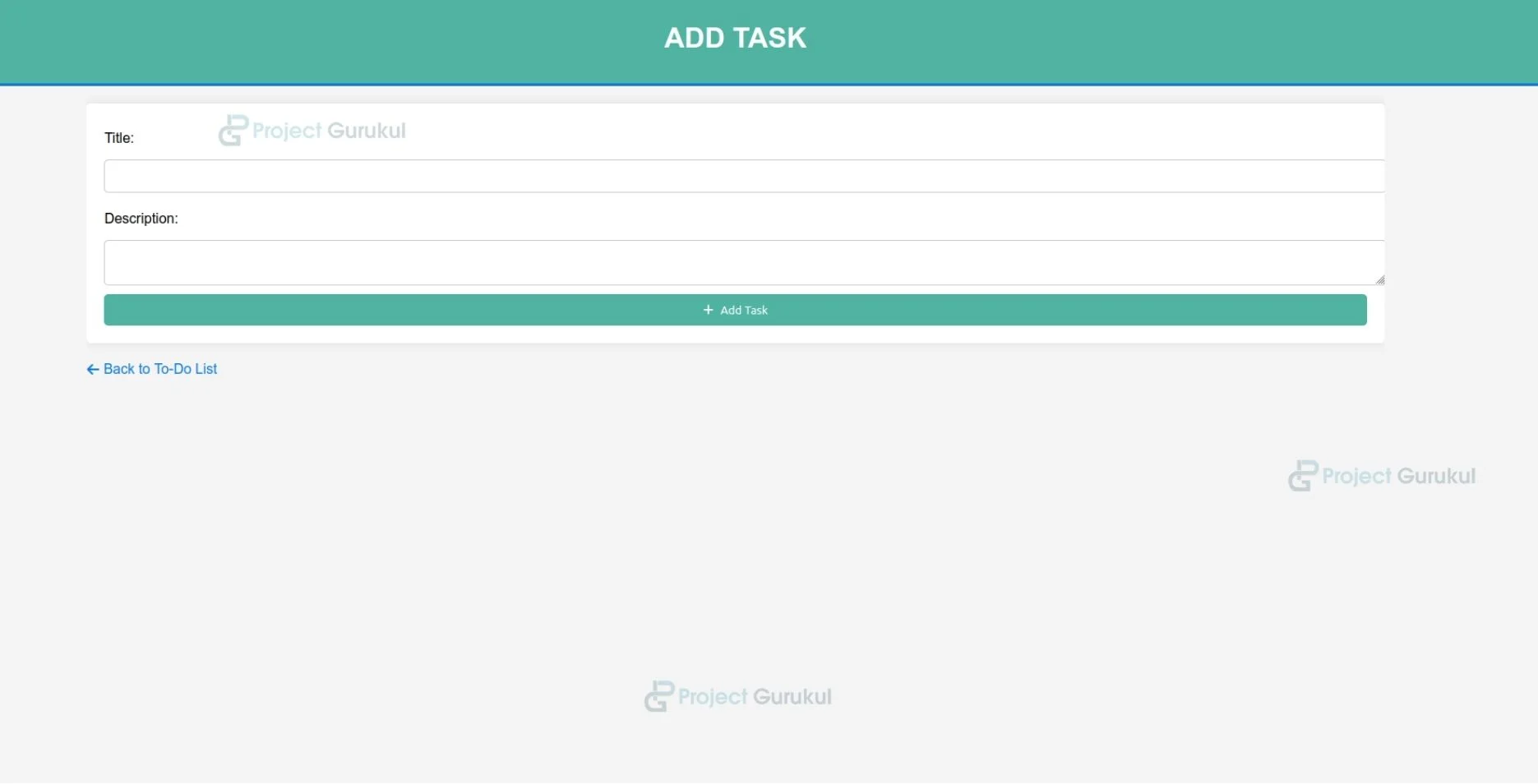
- This template consists of containers that wrap the content in a Bootstrap-like container for styling.
- The POST method starts a form with the HTTP method set to POST.
- It takes a text input field to enter the task title, with the required attribute for form validation.
- This allows users to enter a title & description for a new task.
{% load static %}
<!DOCTYPE html>
<html>
<head>
   <title>Add Task</title>
   <link rel="stylesheet" type="text/css" href="{% static 'todo/styles.css' %}">
   <link rel="stylesheet" href="https://cdnjs.cloudflare.com/ajax/libs/font-awesome/6.0.0-beta3/css/all.min.css">
</head>
<body>
   <header>
       <h1>Add Task</h1>
   </header>
   <div class="container">
       <form method="POST">
           {% csrf_token %}
           <label for="title">Title:</label>
           <input type="text" id="title" name="title" required><br>
           <label for="description">Description:</label>
           <textarea id="description" name="description"></textarea><br>
           <button type="submit"><i class="fas fa-plus"></i> Add Task</button>
       </form>
       <a href="{% url 'index' %}"><i class="fas fa-arrow-left"></i> Back to To-Do List</a>
   </div>
</body>
</html>
Define urls in Urls.py in the todolist project directory:
- The urls.py file in the todo app directory maps URL patterns to views.
- The empty string ‘ ‘ maps to the index view, which displays all tasks.
- add/ maps to the add_task view to add a new task.
- complete/<int:task_id>/ maps to the complete_task view, where <int:task_id> is a placeholder for the task ID.
- delete/<int:task_id>/ maps to the delete_task view
from django.urls import path
from . import views


urlpatterns = [
   path('', views.index, name='index'),
   path('add/', views.add_task, name='add_task'),
   path('complete/<int:task_id>/', views.complete_task, name='complete_task'),
   path('delete/<int:task_id>/', views.delete_task, name='delete_task'),
]
Create a static folder in the todo app directory to add the styles.css file.
- The body uses sans-serif font with a light grey background and no margin or padding.
- The .container centers content with an 80% width and hidden overflow.
- Unordered lists (ul) have no bullets and no padding. List items (ul li) are styled with a white background, teal left border, and spacing.
- Buttons are full-width, white text, with a blue hover state and rounded corners. Icons inside links and buttons have spacing.
body {
   font-family: Arial, sans-serif;
   background-color: #f4f4f4;
   margin: 0;
   padding: 0;
}


.container {
   width: 80%;
   margin: 0 auto;
   overflow: hidden;
}


header {
   background: #50b3a2;
   color: #fff;
   padding-top: 30px;
   min-height: 70px;
   border-bottom: #0779e4 3px solid;
}


header h1 {
   text-align: center;
   text-transform: uppercase;
   margin: 0;
}


ul {
   list-style: none;
   padding: 0;
}


ul li {
   background: #fff;
   margin: 10px 0;
   padding: 10px;
   border-left: 3px solid #50b3a2;
}


a {
   text-decoration: none;
   color: #0779e4;
}


a:hover {
   color: #50b3a2;
}


form {
   background: #fff;
   padding: 20px;
   margin: 20px 0;
   border-radius: 5px;
   box-shadow: 0 0 10px rgba(0, 0, 0, 0.1);
}


form label {
   display: block;
   margin: 10px 0 5px;
}


form input, form textarea {
   width: 100%;
   padding: 10px;
   margin: 10px 0;
   border: 1px solid #ccc;
   border-radius: 5px;
}


a {
   text-decoration: none;
   color: #0779e4;
   display: inline-flex;
   align-items: center;
}


a i {
   margin-right: 5px;
}


a:hover {
   color: #50b3a2;
}


form button {
   display: flex;
   align-items: center;
   justify-content: center;
}


a {
   text-decoration: none;
   color: #0779e4;
   display: inline-flex;
   align-items: center;
}


a i {
   margin-right: 5px;
}


a:hover {
   color: #50b3a2;
}


form button {
   display: flex;
   align-items: center;
   justify-content: center;
}


form button i {
   margin-right: 5px;
}


.container ul li {
   display: flex;
   justify-content: space-between;
   align-items: center;
}


form button i {
   margin-right: 5px;
}


form button {
   display: block;
   width: 100%;
   background: #50b3a2;
   color: #fff;
   border: none;
   padding: 10px;
   cursor: pointer;
   border-radius: 5px;
}


form button:hover {
   background: #0779e4;
}


.completed {
   text-decoration: line-through;
   color: #888;
}
Django To Do List Output
HomePage
Add Task
Delete Task
Applications
The Django-developed To-Do List application has a wide range of applications, offering various functionalities that can be adapted and extended for different purposes, such as Personal Task Management, Educational Purposes, Event Planning, Customer Relationship Management (CRM), etc.
Conclusion
The To-Do List application built using Django is a helpful tool that can be adapted for various personal and professional purposes. Its extensible nature allows for additional features to be integrated, making it a powerful solution for task management across different domains. Whether used for personal productivity, team collaboration, or business operations, the To-Do List application offers a structured approach to managing tasks and improving efficiency.