Python Django Project – Online Library Management System
FREE Online Courses: Elevate Your Skills, Zero Cost Attached - Enroll Now!
A Python Django Online Library Management System (LMS) is a software application that helps libraries manage their collections, circulation, and patrons. LMSs can be used to track the status of books, manage checkouts and returns, and generate reports. They can also be used to provide online access to library catalogues, e-books, and other resources.
About Python Django Online Library Management System
A Python Django Online Library Management System (LMS) aims to streamline operations by efficiently managing inventory, automating circulation processes, and enhancing patron relationship management. It generates insights and reports for informed decision-making, increases operational efficiency, and facilitates integration with e-commerce platforms for online sales.
Prerequisite For Python Django Online Library Management System
- Proficiency in the Python programming language and a comprehensive grasp of the Django web framework are essential requirements.
- A strong understanding of HTML, CSS, and JavaScript is required to develop the project’s user interface.
- Relational Database: You will need to have a good understanding of relational databases, such as SQLite, MySQL, or PostgreSQL, to create and manage the database for the Online library management system project.
Download Python Django Online Library Management System Project
Please download the source code of Python Django Online Library Management System Project: Python Django Online Library Management System Project Code.
Project Setup
Minimum system configuration:
- The operating system requirements include Windows 7 or later, macOS 10.11 or later, or a modern operating system.
- Linux distribution.
- Processor: Intel Core i3 or equivalent.
- RAM: 4 GB or more
- Disk Space: 5 GB or more.
- You have the flexibility to utilize browsers like Google Chrome, Mozilla Firefox, or Microsoft Edge for your browsing needs.
Visual Studio Code can be downloaded from the official website.
When accessing the download page, you have the option to choose the appropriate installer based on your operating system, be it Windows, macOS, or Linux. After downloading the installer, run it and proceed with the installation instructions to install VS Code on your computer.
Benefits of the system:
The Online Library Management System automates book circulation, catalogue management, and user registration, saving time and effort for library staff. It offers online access to e-books and digital resources, enabling convenient searches and item requests from users’ homes. The system’s analytics aid informed decision-making, enhancing operational efficiency, user convenience, and overall library experience.
Here’s a brief explanation of each step, along with the commands to execute:
1. To ensure Python is installed, please download and install the most recent version of Python from the official website. Follow the installation instructions provided for your specific operating system.
2. Install pip: Download the get-pip.py script and run python get-pip.py to install pip.
3. Create a virtual environment: Run python -m venv myenv to create a new virtual environment named ‘myenv’.
4. Activate the virtual environment: Run source myenv/bin/activate on Linux/Mac or myenv\Scripts\activate on Windows to activate the virtual environment.
5. Install Django: Run pip install django to install the latest stable version of Django.
6. Verify installation: Run python -m django –version to verify that Django is installed correctly.
7. Create a new Django project: Run Django-admin start project project to create a new Django project named ‘project’.
8. Start the development server: Run the python manage.py run server to start the development server.
That’s it! A working installation of Django should now be in place, and you should be ready to start building your web application.
Steps to Create “Online Library Management System” Project
1. Open the terminal from the folder where we want to create the project. Right click on mouse -> open in terminal -> write “code .” (space is mandatory between code and “.”)
2. Then go to the project folder -> urls.py and inside urls.py of project, do this -> add “include” in import as shown in the code below and add “path(“”,include(“app.urls”))”
3. Create urls.py in an app for the Online Library Management system project(urls.py is mandatory in both project and app).
4. In setting.py, add the ‘app name”.
5. Now run the server to check, whether everything is working or not. If you see the below image, then we are done with the installation part. To runserver, run command in terminal as follows “py manage.py runserver”.
6. Now, create the models.py using the ORM technique as follows.
To create the above field in a database, run the following commands as follows:
● Py manage.py makemigrations
● Py manage.py migrate
The file structure will look like this for our project:
App(main) -> Templates -> app(folder inside app) -> registration.html, login.html, votingpage.html.
Now, execute the project step by step with code as follows:
Steps to Create Online Library System Project – Let’s Move ahead with an amazing project:
1. Open the terminal from the folder where we want to create the project.
Right click on mouse -> open in terminal -> write “code .” (space is mandatory between code and “.”)
2. Open the terminal from folder where we want to create the project.
Right click on mouse -> open in terminal -> write “code .” (space is mandatory between code and “.”)
3. Then go to the project folder -> urls.py and inside urls.py of project, do this -> add “include” in import as shown in the code below and add “path(“”, include(“app.urls”))”
from django.db import models
from django.contrib.auth.models import User
# Create your models here.
class Book(models.Model):
    user = models.ForeignKey(User, on_delete=models.CASCADE)
    image = models.ImageField(upload_to="media/")
    book_upload = models.FileField(upload_to="pdf/")
    title = models.CharField(max_length=100)
    author = models.CharField(max_length=100)
    publication_date = models.DateField()
The Book model has fields for the user (foreign key to User model), image (ImageField for book cover), book_upload (FileField for PDF upload), and basic information such as title, author, and publication date.
4. Registration of user
templates/app -> register.html
<center><h1>Online Library by ProjectGurukul</h1></center>
  <div class="container">
    {% if messages %}
    {% for message in messages %}
    <div class="alert alert-{{ message.tags }}">
      {{ message }}
    </div>
    {% endfor %}
    {% endif %}
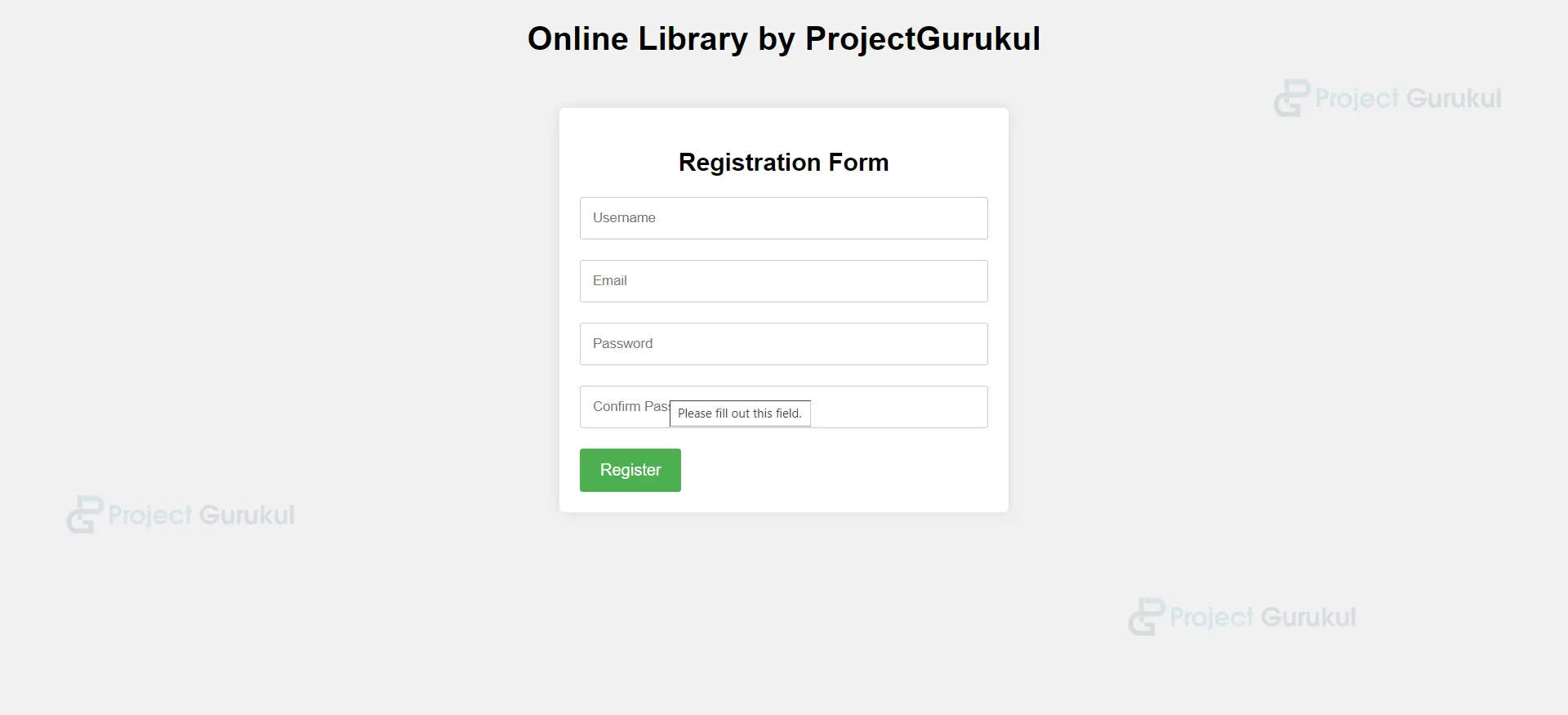
    <h2>Registration Form</h2>
    <form method="post" action="{% url 'registration' %}">
      {% csrf_token %}
      <input type="text" id="username" name="username" placeholder="Username" required>
      <input type="email" id="email" name="email" placeholder="Email" required>
      <input type="password" id="password" name="password" placeholder="Password" required>
      <input type="password" id="confirm_password" name="confirm_password" placeholder="Confirm Password" required>
      <input type="submit" value="Register">
    </form>
  </div>
Views.py
ef registeration(request):
    if request.method == 'POST':
        username = request.POST['username']
        email = request.POST['email']
        password = request.POST['password']
        confirm_password = request.POST['confirm_password']


        if password != confirm_password:
            messages.error(request, "Passwords do not match.")
            return redirect('register')


        if User.objects.filter(username=username).exists():
            messages.error(request, "Username is already taken.")
            return redirect('register')


        if User.objects.filter(email=email).exists():
            messages.error(request, "Email is already registered.")
            return redirect('register')


        user = User.objects.create_user(username=username, email=email, password=password)
        user.save()


        messages.success(request, "Registration successful. You can now log in.")
        return redirect('index')


    return render(request, 'app/register.html')
The registration view handles the registration of new users. The view first checks if the request method is POST. If it is, the view gets the username, email, password, and confirm password from the request. The view then checks if the passwords match. If they do not match, the view displays an error message and redirects the user back to the registration page.
The view then checks if the username is already taken. If it is, the view displays an error message and redirects the user back to the registration page.
The view then checks if the email is already registered. If it is, the view displays an error message and redirects the user back to the registration page.
If the passwords match and the username and email are not already taken, the view creates a new user object. The view then saves the user object and redirects the user to the index page.
5. Create data
templates/app -> add_book.html
<div class="container">
        <p><a href="{% url 'book_list' %}">X</a></p>
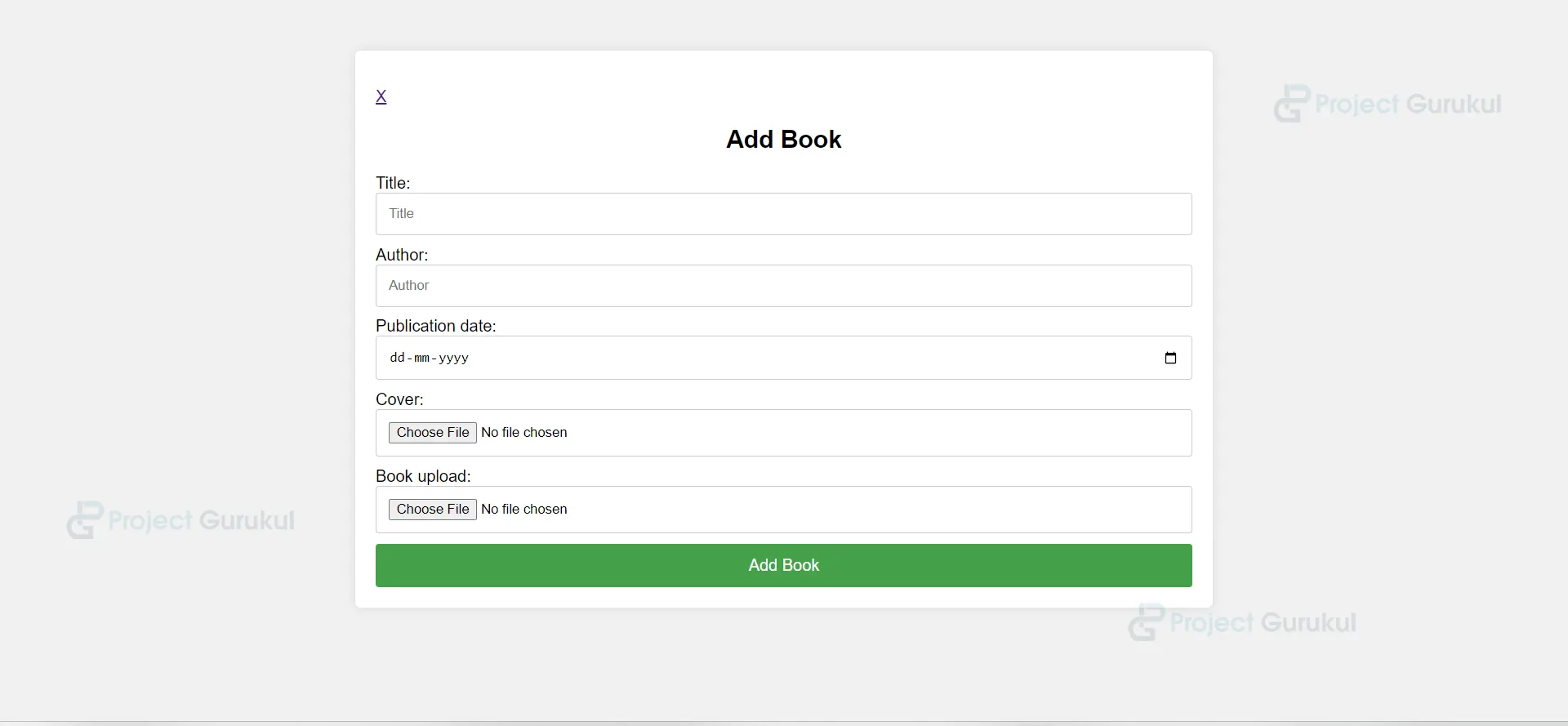
        <h2>Add Book</h2>
        <form method="post" enctype="multipart/form-data">
            {% csrf_token %}
            Title: <input type="text" name="title" placeholder="Title" required>
            Author: <input type="text" name="author" placeholder="Author" required>
            Publication date: <input type="date" name="publication_date" placeholder="Publication Date" required>
            Cover: <input type="file" name="image" accept="image/*" required>
            Book upload: <input type="file" name="book_upload" accept="application/pdf" required>
            <input type="submit" value="Add Book">
        </form>
    </div>
Views.py
@login_required(login_url="index")
def add_book(request):
    if request.method == 'POST':
        title = request.POST['title']
        author = request.POST['author']
        publication_date = request.POST['publication_date']
        image = request.FILES.get('image')
        book_upload = request.FILES.get('book_upload')


        book = Book.objects.create(
            user=request.user,
            title=title,
            author=author,
            publication_date=publication_date,
            image=image,
            book_upload=book_upload
        )
        return redirect('book_list')
    return render(request, 'app/add_book.html')
6. For Login Page
templates/app -> login.html
<center><h1>Online Library by ProjectGurukul</h1></center>
  <div class="container">
    {% if messages %}
    {% for message in messages %}
    <div class="alert alert-{{ message.tags }}">
      {{ message }}
    </div>
    {% endfor %}
    {% endif %}
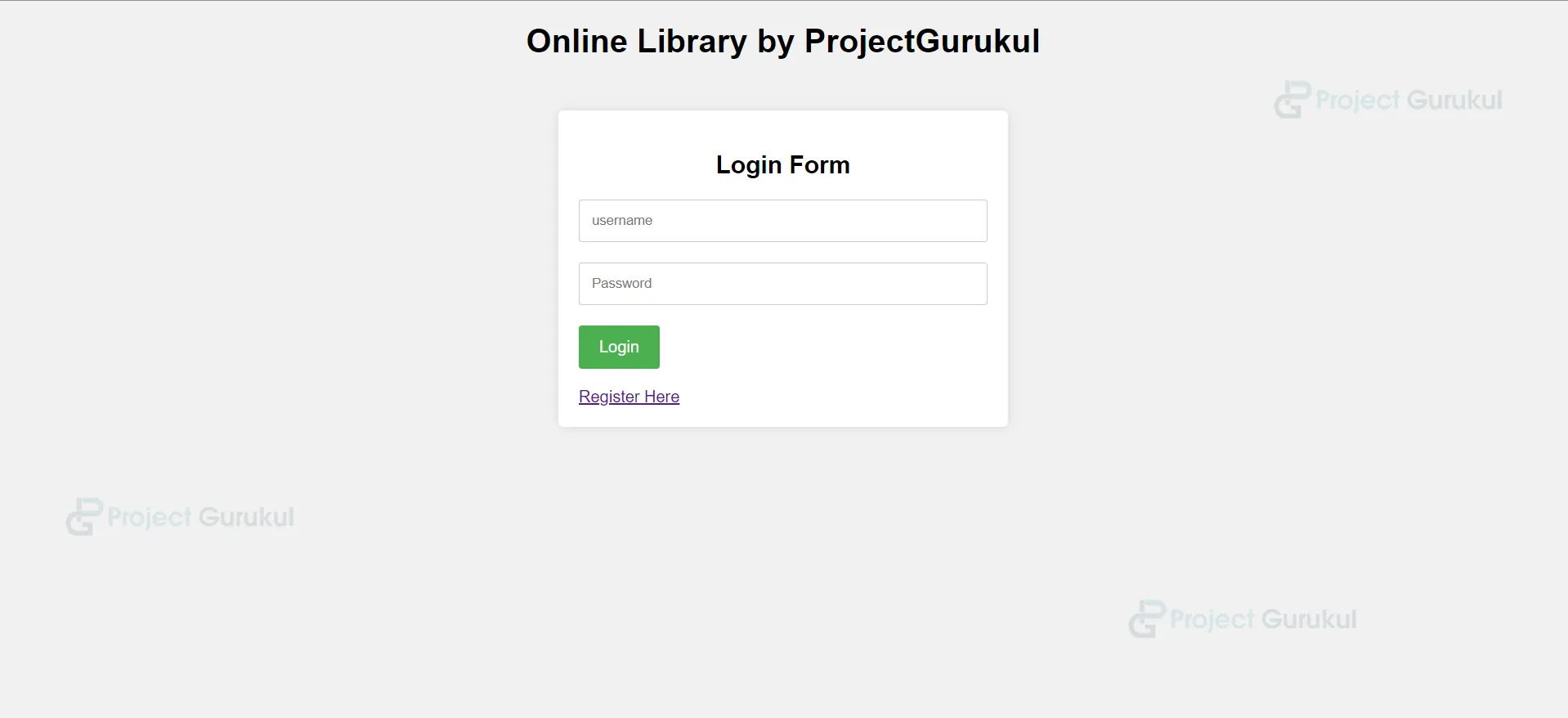
    <h2>Login Form</h2>
    <form action="{% url 'user_login' %}" method="post">
      {% csrf_token %}
      <input type="text" id="email" name="username" placeholder="username" required>
      <input type="password" id="password" name="password" placeholder="Password" required>
      <input type="submit" value="Login"><br><br>
      <a href="{% url 'register' %}">Register Here</a>
    </form>
  </div>
Views.py
def user_login(request):
    if request.method == 'POST':
        username = request.POST['username']
        password = request.POST['password']


        # Authenticate user
        user = authenticate(request, username=username, password=password)


        if user is not None:
            # Log in the user
            login(request, user)
            return redirect('book_list')
        else:
            messages.error(request, "Invalid username or password.")
            return redirect('book_list')


    return render(request, 'app/login.html')
The user_login view handles the login of users. The view first checks if the request method is POST. If it is, the view gets the username and password from the request. The view then uses the authenticate() function to check if the username and password are valid. If they are valid, the view logs the user in. If they are not valid, the view displays an error message.
The view then redirects the user to the book list page if the login is successful.
7. For Book List
Refer templates/app -> home.html
def book_list(request):
    books = Book.objects.all()
    query = request.GET.get('search') # Get the search query from the request

    if query:
        books = books.filter(title__icontains=query) | books.filter(author__icontains=query)
    return render(request, 'app/home.html', {'books': books}
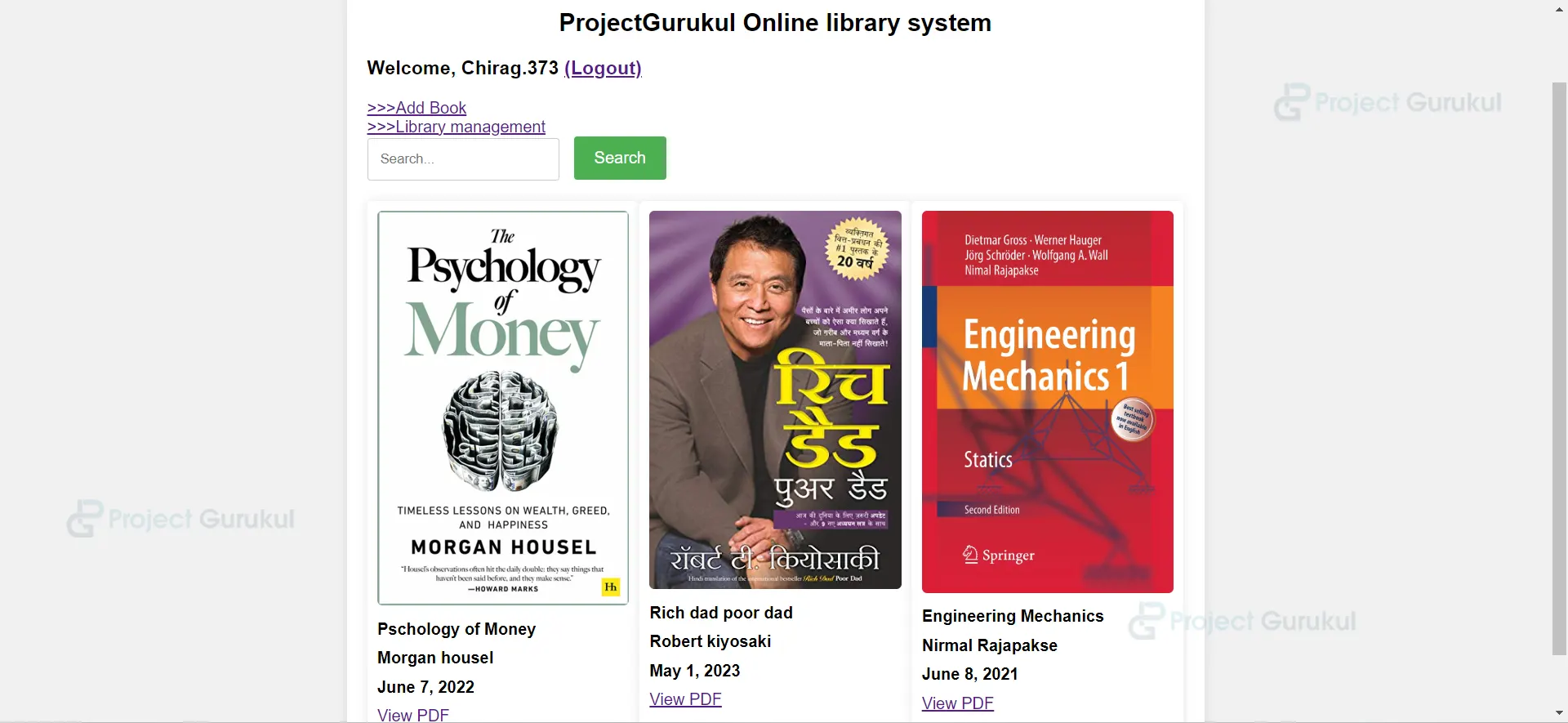
The book_list view handles the display of the book list. The view first gets all of the books from the database. The view then gets the search query from the request. If the search query is not empty, the view filters the books by the search query. The view then renders the app/home.html template with the books as a context variable.
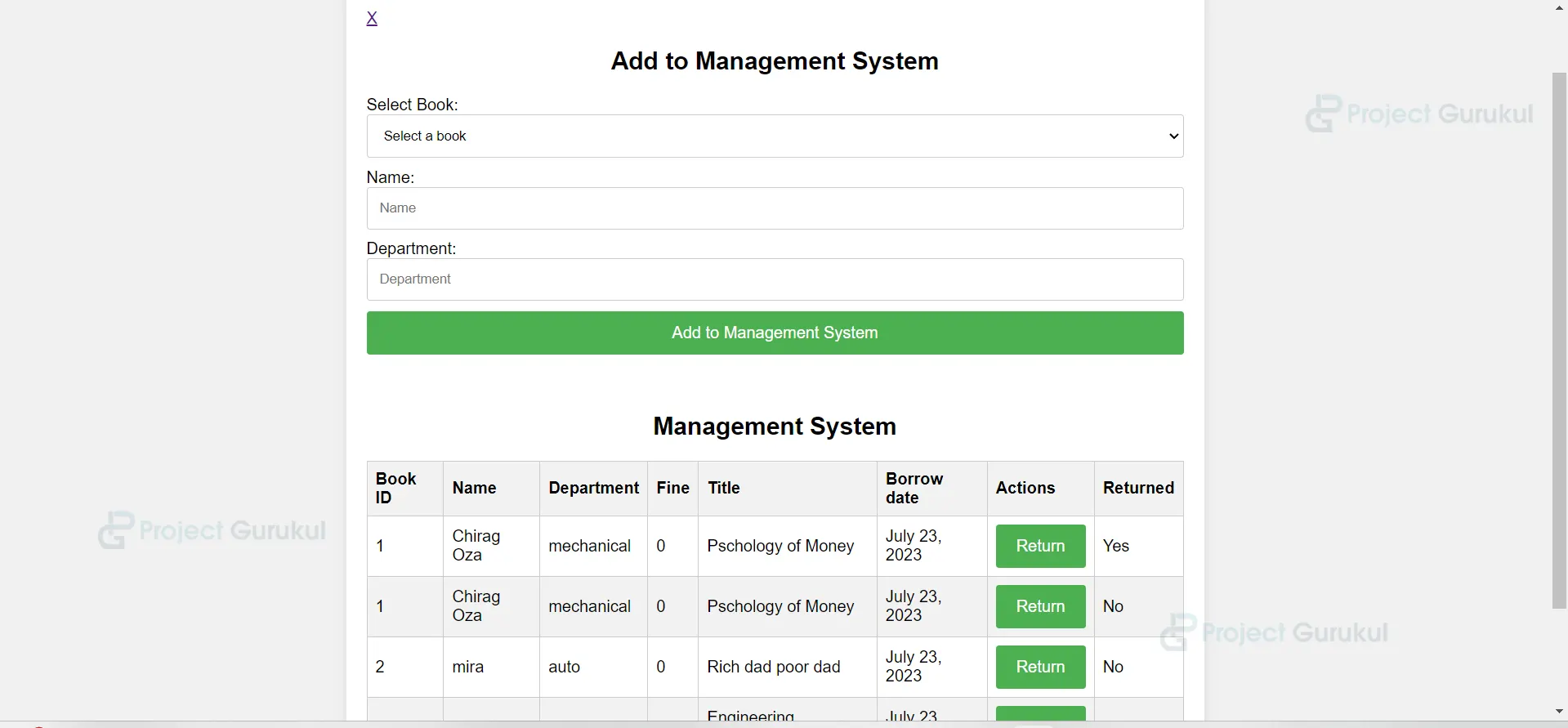
8. For library management system, which helps manage borrow, returned and fine.
template/app -> showed_borrowed_mgmt.html
<div class="container">
        <p><a href="{% url 'book_list' %}">X</a></p>
        <h2>Add to Management System</h2>
        <form method="post" action="{% url 'borrow' %}">
            {% csrf_token %}
            <!-- Book select dropdown -->
            <label for="book_select">Select Book:</label>
            <select id="book_select" name="book_select" required>
                <option value="" disabled selected>Select a book</option>
                {% for book in books %}
                <option value="{{ book.id }}">{{ book.title }}</option>
                {% endfor %}
            </select>


            <label for="name">Name:</label>
            <input type="text" id="name" name="name" placeholder="Name" required>


            <label for="department">Department:</label>
            <input type="text" id="department" name="department" placeholder="Department" required>


            <input type="submit" value="Add to Management System">
        </form>
        <br><br>
        <h2>Management System</h2>
        <table>
            <thead>
                <tr>


                    <th>Book ID</th>
                    <th>Name</th>
                    <th>Department</th>
                    <th>Fine</th>
                    <th>Title</th>
                    <th>Borrow date</th>
                    <th>Actions</th>
                    <th>Returned</th>


                </tr>
            </thead>
            <tbody>
                {% for borrow in borrows %}
                <tr>
                    <td>{{ borrow.book_id }}</td>
                    <td>{{ borrow.name }}</td>
                    <td>{{ borrow.department }}</td>
                    <td>{{ borrow.fine }}</td>
                    <td>{{ borrow.book.title }}</td>
                    <td>{{ borrow.borrow_date }}</td>
                    <td>
                        <form method="post" action="{% url 'return_book' pk=borrow.pk %}">
                            {% csrf_token %}
                            <input type="submit" value="Return">
                        </form>
                    </td>
                    <td>{{ borrow.returned }}</td>
                </tr>
                {% endfor %}
            </tbody>
        </table>


    </div>
Views.py
@login_required(login_url="index")
def add_borrower(request):
    if request.method == 'POST':
        book_select = request.POST['book_select']
        name = request.POST['name']
        department = request.POST['department']


        borrow_date = date.today()
        fine = calculate_fine(borrow_date)


        book_entry = Borrower.objects.create(
            book_id=book_select,
            name=name,
            department=department,
            borrow_date=borrow_date,
            fine=fine
        )


        return redirect('borrow')

    books = Book.objects.all()
    borrows = Borrower.objects.all()


    return render(request, 'app/showed_borrowed_mgmt.html', {"books": books, "borrows": borrows})


#function for calculating the fine
@login_required(login_url="index")
def calculate_fine(borrow_date):
    fine_per_day = 5
    days_difference = (date.today() - borrow_date).days


    if days_difference > 5:
        fine = fine_per_day * (days_difference - 5)
    else:
        fine = 0


    return fine
The “add_borrower” function is a Django view that handles adding a new borrower to a library management system. It processes a POST request, extracts form data (book_select, name, department), calculates the borrowing date, fine, and creates a new “Borrower” object in the database with the collected data. If successful, it redirects the user to the ‘borrow’ page.
The “calculate_fine” function takes the borrowing date as input and calculates the fine by determining the days_difference between the borrowing date and the current date. If days_difference is greater than 5, the fine is set as 5 per day for each day exceeding the allowed period; otherwise, the fine is set to 0. The function returns the calculated fine amount.
9. For Signout Process
Views.py
def signout(request):
    if request.user.is_authenticated:
        logout(request)
    return redirect('index')
The signout view handles the logout of users. The view first checks if the user is logged in. If the user is logged in, the view logs the user out. If the user is not logged in, the view redirects the user to the index page.
Urls.py For Above:
from django.urls import path
from .views import Index, Register, registeration, user_login, book_list, view_pdf, signout
from django.conf import settings
from django.conf.urls.static import static


urlpatterns = [
    path("", Index, name="index"),
    path("register", Register, name="register"),
    path("registration", registeration, name="registration"),
    path("user_login", user_login , name="user_login"),
    path("book_list", book_list, name="book_list"),
    path("view_pdf/<int:pk>", view_pdf, name="view_pdf"),
    path("signout", signout, name="signout")
]


urlpatterns += static(settings.MEDIA_URL, document_root=settings.MEDIA_ROOT)
Explanation for the above code:
The provided code consists of views in a Django application for an online library management system. Let’s go through the code and understand how the logic works and how it is connected to the HTML templates.
- The views in the code handle different functionalities of the online library management system, such as registration, login, book addition, book listing, book update, and book deletion.
- Each view corresponds to a specific URL and is triggered when the user interacts with that URL.
- The views interact with the HTML templates to render dynamic content and receive data from the user.
- When a user visits a specific URL, the corresponding view function is executed.
- The view functions perform necessary operations, such as retrieving data from the database, processing user input, and rendering HTML templates with the appropriate data.
- The HTML templates are responsible for presenting the data and providing an interface for user interaction.
The views use the render function to render the HTML templates and pass data to the templates using context variables. - In the HTML templates, Django template tags and expressions are used to access and display the data passed from the views.
- For example, in the book_list view, the book data is retrieved from the database and filtered based on the search query. The filtered query set is then passed to the home.html template using the render function.
- In the home.html template, the book data is accessed using Django template variables and displayed in an HTML table. The template additionally incorporates a search form, enabling users to input a search query and submit it to filter the list of books.
- Similarly, other views and templates in the code follow a similar pattern, where the views handle the logic and data processing, and the templates handle the presentation of the data and user interaction.
Overall, the code establishes the connection between the views, which handle the application logic, and the HTML templates, which render the data and provide an interface for user interaction
templates/app -> home.html
<!DOCTYPE html>
<html>


<head>
  <title>Homepage</title>
  <style>
    body {
      font-family: Arial, sans-serif;
      background-color: #f1f1f1;
    }


    .container {
      max-width: 800px;
      margin: 0 auto;
      padding: 20px;
      background-color: #fff;
      box-shadow: 0px 0px 10px rgba(0, 0, 0, 0.1);
      border-radius: 5px;
      margin-top: 50px;
    }


    h2 {
      text-align: center;
      margin-bottom: 20px;
    }


    .search-container {
      display: flex;
      align-items: center;
      margin-bottom: 20px;
    }


    .search-container input[type="text"] {
      flex-grow: 1;
      padding: 12px;
      border: 1px solid #ccc;
      border-radius: 3px;
      box-sizing: border-box;
    }


    .search-container input[type="submit"] {
      background-color: #4CAF50;
      color: #fff;
      padding: 12px 20px;
      border: none;
      border-radius: 3px;
      margin-left: 10px;
      cursor: pointer;
      font-size: 16px;
    }


    .search-container input[type="submit"]:hover {
      background-color: #45a049;
    }


    .book-container {
      display: flex;
      justify-content: space-between;
      flex-wrap: wrap;
    }


    .book-card {
      width: calc(33.33% - 20px);
      margin-bottom: 20px;
      background-color: #fff;
      box-shadow: 0px 0px 10px rgba(0, 0, 0, 0.1);
      border-radius: 5px;
      padding: 10px;
    }


    .book-card img {
      width: 100%;
      height: auto;
      border-radius: 5px;
    }


    .book-card h3 {
      margin: 10px 0;
      font-size: 16px;
    }
  </style>
</head>


<body>
  <div class="container">
    {% if request.user.is_authenticated %}
    <h2>Homepage</h2><h3> Welcome, {{request.user }} <a href="{% url 'signout' %}">Logout</a></h3>
    {% endif %}
    <div class="search-container">
      <form method="GET">
        <!-- Add the form element and specify the 'book_list' URL pattern -->
        <input type="text" id="search" name="search" placeholder="Search...">
        <input type="submit" value="Search">
      </form>
    </div>
    <div class="book-container">
      {% for book in books %}
      <div class="book-card">
        <img src="{{ book.image.url }}" alt="{{ book.title }}">
        <h3>{{ book.title }}</h3>
        <h3>{{ book.author }}</h3>
        <h3>{{ book.publication_date }}</h3>
        <a href="{% url 'view_pdf' pk=book.pk %}">View PDF</a>
      </div>
      {% empty %}


      <h3 style="color: grey;">No book found</h3>
      {% endfor %}
    </div>
  </div>
</body>


</html>
templates/app -> login.html
<!DOCTYPE html>
<html>


<head>
  <title>Login Form</title>
  <style>
    body {
      font-family: Arial, sans-serif;
      background-color: #f1f1f1;
    }


    .container {
      max-width: 400px;
      margin: 0 auto;
      padding: 20px;
      background-color: #fff;
      box-shadow: 0px 0px 10px rgba(0, 0, 0, 0.1);
      border-radius: 5px;
      margin-top: 50px;
    }


    h2 {
      text-align: center;
      margin-bottom: 20px;
    }


    input[type="text"],
    input[type="password"] {
      width: 100%;
      padding: 12px;
      margin-bottom: 20px;
      border: 1px solid #ccc;
      border-radius: 3px;
      box-sizing: border-box;
    }


    input[type="submit"] {
      background-color: #4CAF50;
      color: #fff;
      padding: 12px 20px;
      border: none;
      border-radius: 3px;
      cursor: pointer;
      font-size: 16px;
    }


    input[type="submit"]:hover {
      background-color: #45a049;
    }
  </style>
</head>


<body>
  <center><h1>Online Library by ProjectGurukul</h1></center>
  <div class="container">
    {% if messages %}
    {% for message in messages %}
    <div class="alert alert-{{ message.tags }}">
      {{ message }}
    </div>
    {% endfor %}
    {% endif %}
    <h2>Login Form</h2>
    <form action="{% url 'user_login' %}" method="post">
      {% csrf_token %}
      <input type="text" id="email" name="username" placeholder="username" required>
      <input type="password" id="password" name="password" placeholder="Password" required>
      <input type="submit" value="Login"><br><br>
      <a href="{% url 'register' %}">Register Here</a>
    </form>
  </div>
</body>


</html>
templates/app -> register
<!DOCTYPE html>
<html>


<head>
  <title>Registration Form</title>
  <style>
    body {
      font-family: Arial, sans-serif;
      background-color: #f1f1f1;
    }


    .container {
      max-width: 400px;
      margin: 0 auto;
      padding: 20px;
      background-color: #fff;
      box-shadow: 0px 0px 10px rgba(0, 0, 0, 0.1);
      border-radius: 5px;
      margin-top: 50px;
    }


    h2 {
      text-align: center;
      margin-bottom: 20px;
    }


    input[type="text"],
    input[type="email"],
    input[type="password"] {
      width: 100%;
      padding: 12px;
      margin-bottom: 20px;
      border: 1px solid #ccc;
      border-radius: 3px;
      box-sizing: border-box;
    }


    input[type="submit"] {
      background-color: #4CAF50;
      color: #fff;
      padding: 12px 20px;
      border: none;
      border-radius: 3px;
      cursor: pointer;
      font-size: 16px;
    }


    input[type="submit"]:hover {
      background-color: #45a049;
    }
  </style>
</head>


<body>
  <center><h1>Online Library by ProjectGurukul</h1></center>
  <div class="container">
    {% if messages %}
    {% for message in messages %}
    <div class="alert alert-{{ message.tags }}">
      {{ message }}
    </div>
    {% endfor %}
    {% endif %}
    <h2>Registration Form</h2>
    <form method="post" action="{% url 'registration' %}">
      {% csrf_token %}
      <input type="text" id="username" name="username" placeholder="Username" required>
      <input type="email" id="email" name="email" placeholder="Email" required>
      <input type="password" id="password" name="password" placeholder="Password" required>
      <input type="password" id="confirm_password" name="confirm_password" placeholder="Confirm Password" required>
      <input type="submit" value="Register">
    </form>
  </div>
</body>


</html>
templates/app -> add_book.html
<!-- add_book.html -->
<!DOCTYPE html>
<html>


<head>
    <title>Add Book</title>
    <style>
        body {
            font-family: Arial, sans-serif;
            background-color: #f1f1f1;
        }


        .container {
            max-width: 800px;
            margin: 0 auto;
            padding: 20px;
            background-color: #fff;
            box-shadow: 0px 0px 10px rgba(0, 0, 0, 0.1);
            border-radius: 5px;
            margin-top: 50px;
        }


        h2 {
            text-align: center;
            margin-bottom: 20px;
        }


        form {
            display: flex;
            flex-direction: column;
        }


        input[type="text"],
        input[type="date"],
        input[type="file"] {
            margin-bottom: 10px;
            padding: 12px;
            border: 1px solid #ccc;
            border-radius: 3px;
            box-sizing: border-box;
        }


        input[type="submit"] {
            background-color: #4CAF50;
            color: #fff;
            padding: 12px 20px;
            border: none;
            border-radius: 3px;
            cursor: pointer;
            font-size: 16px;
        }


        input[type="submit"]:hover {
            background-color: #45a049;
        }
    </style>
    </style>
</head>


<body>


    <div class="container">
        <p><a href="{% url 'book_list' %}">X</a></p>
        <h2>Add Book</h2>
        <form method="post" enctype="multipart/form-data">
            {% csrf_token %}
            Title: <input type="text" name="title" placeholder="Title" required>
            Author: <input type="text" name="author" placeholder="Author" required>
            Publication date: <input type="date" name="publication_date" placeholder="Publication Date" required>
            Cover: <input type="file" name="image" accept="image/*" required>
            Book upload: <input type="file" name="book_upload" accept="application/pdf" required>
            <input type="submit" value="Add Book">
        </form>
    </div>
</body>


</html>
templates/app -> showed_borrowed_mgmt.html
<!-- add_to_management_system.html -->
<!DOCTYPE html>
<html>


<head>
    <title>Add to Management System</title>
    <style>
        body {
            font-family: Arial, sans-serif;
            background-color: #f1f1f1;
        }


        .container {
            max-width: 800px;
            margin: 0 auto;
            padding: 20px;
            background-color: #fff;
            box-shadow: 0px 0px 10px rgba(0, 0, 0, 0.1);
            border-radius: 5px;
            margin-top: 50px;
        }


        h2 {
            text-align: center;
            margin-bottom: 20px;
        }


        form {
            display: flex;
            flex-direction: column;
        }


        input[type="text"],
        input[type="date"],
        input[type="file"],
        select {
            margin-bottom: 10px;
            padding: 12px;
            border: 1px solid #ccc;
            border-radius: 3px;
            box-sizing: border-box;
        }


        input[type="submit"] {
            background-color: #4CAF50;
            color: #fff;
            padding: 12px 20px;
            border: none;
            border-radius: 3px;
            cursor: pointer;
            font-size: 16px;
        }


        input[type="submit"]:hover {
            background-color: #45a049;
        }


        table {
            width: 100%;
            border-collapse: collapse;
            margin-top: 20px;
        }


        th,
        td {
            border: 1px solid #ccc;
            padding: 8px;
            text-align: left;
        }


        thead th {
            background-color: #f2f2f2;
            scroll-behavior: auto;
        }


        tbody tr:nth-child(even) {
            background-color: #f2f2f2;
        }
    </style>
</head>


<body>
    <div class="container">
        <p><a href="{% url 'book_list' %}">X</a></p>
        <h2>Add to Management System</h2>
        <form method="post" action="{% url 'borrow' %}">
            {% csrf_token %}
            <!-- Book select dropdown -->
            <label for="book_select">Select Book:</label>
            <select id="book_select" name="book_select" required>
                <option value="" disabled selected>Select a book</option>
                {% for book in books %}
                <option value="{{ book.id }}">{{ book.title }}</option>
                {% endfor %}
            </select>


            <label for="name">Name:</label>
            <input type="text" id="name" name="name" placeholder="Name" required>


            <label for="department">Department:</label>
            <input type="text" id="department" name="department" placeholder="Department" required>


            <input type="submit" value="Add to Management System">
        </form>
        <br><br>
        <h2>Management System</h2>
        <table>
            <thead>
                <tr>


                    <th>Book ID</th>
                    <th>Name</th>
                    <th>Department</th>
                    <th>Fine</th>
                    <th>Title</th>
                    <th>Borrow date</th>
                    <th>Actions</th>
                    <th>Returned</th>


                </tr>
            </thead>
            <tbody>
                {% for borrow in borrows %}
                <tr>
                    <td>{{ borrow.book_id }}</td>
                    <td>{{ borrow.name }}</td>
                    <td>{{ borrow.department }}</td>
                    <td>{{ borrow.fine }}</td>
                    <td>{{ borrow.book.title }}</td>
                    <td>{{ borrow.borrow_date }}</td>
                    <td>
                        <form method="post" action="{% url 'return_book' pk=borrow.pk %}">
                            {% csrf_token %}
                            <input type="submit" value="Return">
                        </form>
                    </td>
                    <td>{{ borrow.returned }}</td>
                </tr>
                {% endfor %}
            </tbody>
        </table>


    </div>
</body>


</html>
Views.py
from django.shortcuts import render, redirect, get_object_or_404, HttpResponse
from django.http import FileResponse
from django.contrib import messages
from django.contrib.auth.models import User
from django.contrib.auth import authenticate, login, logout
from django.contrib.auth.decorators import login_required
from .models import Book, Borrower
from datetime import datetime, date, timedelta
from django.utils import timezone


def Index(request):
    return render(request, "app/login.html")


def Register(request):
    return render(request, "app/register.html")


def registeration(request):
    if request.method == 'POST':
        username = request.POST['username']
        email = request.POST['email']
        password = request.POST['password']
        confirm_password = request.POST['confirm_password']


        if password != confirm_password:
            messages.error(request, "Passwords do not match.")
            return redirect('register')


        if User.objects.filter(username=username).exists():
            messages.error(request, "Username is already taken.")
            return redirect('register')


        if User.objects.filter(email=email).exists():
            messages.error(request, "Email is already registered.")
            return redirect('register')


        user = User.objects.create_user(username=username, email=email, password=password)
        user.save()


        messages.success(request, "Registration successful. You can now log in.")
        return redirect('index')


    return render(request, 'app/register.html')


def user_login(request):
    if request.method == 'POST':
        username = request.POST['username']
        password = request.POST['password']


        user = authenticate(request, username=username, password=password)


        if user is not None:
            login(request, user)
            return redirect('book_list')
        else:
            messages.error(request, "Invalid username or password.")
            return redirect('book_list')
    return render(request, 'app/login.html')


@login_required(login_url="index")
def add_book(request):
    if request.method == 'POST':
        title = request.POST['title']
        author = request.POST['author']
        publication_date = request.POST['publication_date']
        image = request.FILES.get('image')
        book_upload = request.FILES.get('book_upload')


        book = Book.objects.create(
            user=request.user,
            title=title,
            author=author,
            publication_date=publication_date,
            image=image,
            book_upload=book_upload
        )
        return redirect('book_list')
    return render(request, 'app/add_book.html')


@login_required(login_url="index")
def book_list(request):
    books = Book.objects.all()
    query = request.GET.get('search')

    if query:
        books = books.filter(title__icontains=query) | books.filter(author__icontains=query)
    return render(request, 'app/home.html', {'books': books})


@login_required(login_url="index")
def add_borrower(request):
    if request.method == 'POST':
        book_select = request.POST['book_select']
        name = request.POST['name']
        department = request.POST['department']


        borrow_date = date.today()
        fine = calculate_fine(borrow_date)


        book_entry = Borrower.objects.create(
            book_id=book_select,
            name=name,
            department=department,
            borrow_date=borrow_date,
            fine=fine
        )


        return redirect('borrow')

    books = Book.objects.all()
    borrows = Borrower.objects.all()


    return render(request, 'app/showed_borrowed_mgmt.html', {"books": books, "borrows": borrows})


@login_required(login_url="index")
def calculate_fine(borrow_date):
    fine_per_day = 5
    days_difference = (date.today() - borrow_date).days


    if days_difference > 5:
        fine = fine_per_day * (days_difference - 5)
    else:
        fine = 0


    return fine


@login_required(login_url="index")
def return_book(request, pk):
    borrower = get_object_or_404(Borrower, pk=pk)


    if request.method == 'POST':
        if borrower.returned == 'No':
            borrower.fine = 0
            borrower.returned = 'Yes'
            borrower.save()


    return redirect('borrow')


@login_required(login_url="index")
def view_pdf(request, pk):
    book = get_object_or_404(Book, pk=pk)
    file_path = book.book_upload.path
    return FileResponse(open(file_path, 'rb'), content_type='application/pdf')


@login_required(login_url="index")
def signout(request):
    if request.user.is_authenticated:
        logout(request)
    return redirect('index')
Python Django Online Library Management System Output:
Summary
The Online Library Management System is a Django-based application aimed at efficiently managing library operations. It enables users to register, log in, and perform tasks like adding, updating, and deleting books. The system provides search functionality to filter and display books based on title, author, genre, or other criteria. It streamlines inventory management, enhances patron experience, and facilitates efficient circulation processes.
“My project is completed Online Library Management System Project
def book_list(request):
books = Book.objects.all()
query = request.GET.get(‘search’) # Get the search query from the request
if query:
books = books.filter(title__icontains=query) | books.filter(author__icontains=query)
return render(request, ‘app/home.html’, {‘books’: books}
I want admin username and password to run admin side project