Python OpenCV Project – PPE Detection
FREE Online Courses: Your Passport to Excellence - Start Now
Personal Protective Equipment (PPE) detection is a critical application of computer vision and machine learning, aimed at enhancing workplace safety. PPE detection systems utilize advanced algorithms to identify and ensure the proper use of safety gear such as helmets, gloves, masks and goggles by individuals in various industries.
These systems play a vital role in minimizing workplace accidents, ensuring compliance with safety regulations, and safeguarding workers’ health and well-being, making them a valuable asset in today’s safety-conscious environment.
What is VGG16?
VGG16 (Visual Geometry Group 16) is a widely used convolutional neural network architecture for deep learning. It features 16 weight layers, including 13 convolutional layers and 3 fully connected layers, designed for image classification and object recognition tasks. VGG16 is known for its simplicity and effectiveness, making it a popular choice in computer vision applications
Dataset
The PPE (Personal Protective Equipment) dataset is a collection of images that includes various types of safety gear, like helmets, gloves, face shields, and more, used for protection in diverse environments.
Prerequisites For Python OpenCV PPE Detection
It requires strong proficiency in Python and the OpenCV library and adherence to specific system requirements.
- Python 3.7 (64-bit) and above
- Any Python editor (VS code, Pycharm)
- GPU 4.00 GB+
Note: Google Colab is used in this project.
Download Python OpenCV PPE Detection Project
Please download the source code of Python OpenCV PPE Detection Project: Python OpenCV PPE Detection Project Code.
Installation
Open windows cmd as administrator
1. Install OpenCV library.
pip install opencv-python
2. Install tensorflow library.
pip install tensorflow
Let’s Implement
1. Bring in all the necessary packages.
import tensorflow as tf
from tensorflow.keras.preprocessing.image import ImageDataGenerator
from tensorflow.keras.optimizers import RMSprop
from tensorflow.keras.applications import VGG16
from tensorflow.keras.layers import Dense, GlobalAveragePooling2D
from tensorflow.keras.preprocessing import image
import numpy as np
import matplotlib.pyplot as plt
2. It preprocesses images by rescaling and applying various data augmentation techniques, such as rotation and flipping.
datagen = ImageDataGenerator(
    rescale=1.0/255.0,
    rotation_range=20,
    width_shift_range=0.2,
    height_shift_range=0.2,
    shear_range=0.2,
    zoom_range=0.2,
    horizontal_flip=True,
    fill_mode='nearest'
)
3. It sets the training directory, configures a data generator for image input and prepares it for training.
train_data_directory = '/content/data'

train_dataset = datagen.flow_from_directory(
    train_data_directory,
    target_size=(224, 224),
    batch_size=32,
    class_mode='categorical',
    shuffle=True
)
4. It utilizes the pre-trained VGG16 model. Next, It removes the top layer and adds custom layers, sets the base model layers as non-trainable.
base_model = VGG16(weights='imagenet', include_top=False, input_shape=(224, 224, 3))
x = base_model.output
x = GlobalAveragePooling2D()(x)
x = Dense(512, activation='relu')(x)
predictions = Dense(5, activation='softmax')(x)
model = tf.keras.Model(inputs=base_model.input, outputs=predictions)

for layer in base_model.layers:
    layer.trainable = False
5. It compiles the model with loss, optimizer, metrics and then trains the model on the training dataset for 20 epochs.
model.compile(
    loss='categorical_crossentropy',
    optimizer=RMSprop(learning_rate=0.0001),
    metrics=['accuracy']
)

model.fit(
    train_dataset,
    steps_per_epoch=len(train_dataset),
    epochs=20,
)
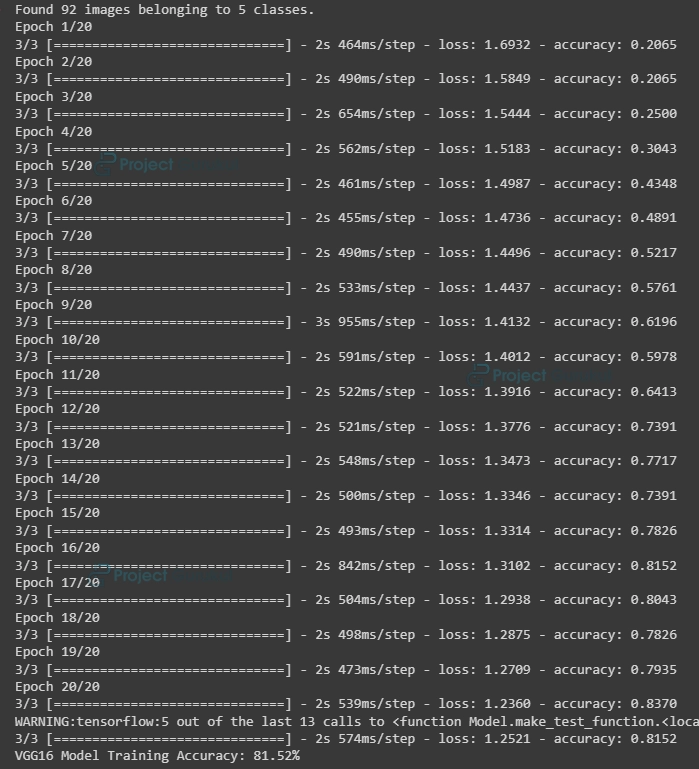
6. It evaluates the VGG16 model’s training accuracy and saves the model.
_, train_accuracy = model.evaluate(train_dataset)
print(f"VGG16 Model Training Accuracy: {train_accuracy * 100:.2f}%")

model.save('vgg16_based_ppe_model.h5')
Output of this step:
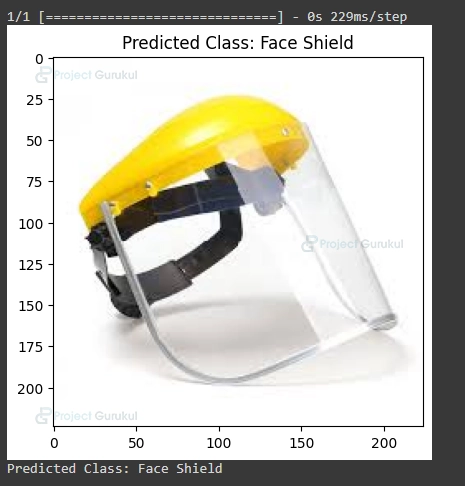
7. It loads a pre-trained VGG16 based PPE detection model and displays the image with the predicted class for an input image.
model = tf.keras.models.load_model('/content/vgg16_based_ppe_model.h5')
def recognize_ppe(image_path):
    img = image.load_img(image_path, target_size=(224, 224))
    img_array = image.img_to_array(img)
    img_array = np.expand_dims(img_array, axis=0)
    img_array /= 255.0
    predictions = model.predict(img_array)
    predicted_class = np.argmax(predictions)
    class_labels = {
        0: 'Body Cover',
        1: 'Eye Glasses',
        2: 'Face Shield',
        3: 'Hand Gloves',
        4: 'Helmet'
    }
    recognized_class = class_labels.get(predicted_class, 'Unknown')
    return img, recognized_class
image_path = '/content/data/Helmet/6.jpg'
input_image, predicted_class = recognize_ppe(image_path)
plt.imshow(input_image)
plt.title(f'Predicted Class: {predicted_class}')
plt.show()
print(f"Predicted Class: {predicted_class}")
Python OpenCV PPE Detection Output



Conclusion
In conclusion, the utilization of VGG16 in PPE detection has proven to be a highly effective and efficient approach. This deep learning model’s ability to accurately identify and classify personal protective equipment (PPE) in various classes demonstrates its potential for enhancing safety and compliance in workplaces.
By harnessing the power of VGG16, we can significantly improve PPE monitoring and ensure a safer environment for workers, mitigating potential hazards and promoting overall well-being.