Java Project – HR Help Desk System
FREE Online Courses: Enroll Now, Thank us Later!
Welcome to our comprehensive guide on the HR Help Desk System project in Java! In today’s fast-paced business environment, efficient human resource management is crucial for any organization’s success. The HR Help Desk System is a powerful tool designed to streamline HR operations and enhance employee management processes.
This Java project aims to provide a user-friendly solution for HR professionals and administrators to handle various HR tasks effectively. From employee onboarding and information management to employee search and removal, the HR Help Desk System simplifies and automates numerous HR functions, saving valuable time and effort. So, without further ado, let’s embark on this exciting journey of developing and exploring the HR Help Desk System in Java!
About Java HR Help Desk System
We will implement the following functionalities in the Java HR Help Desk System Project:
- We will define an Employee class that represents an employee with properties such as name, department, email, phone number and salary.
- The HRHelpDesk class will manage a list of employees and provide methods for adding, printing, searching, and removing employees, as well as updating salary and other details.
- The HRHelpDeskSystem class will serve as the entry point for the HR Help Desk System. It will create an instance of the HRHelpDesk class and a Scanner object for user input.
- Inside the main method of HRHelpDeskSystem, we will implement a menu-driven loop to interact with the user. The user will be able to choose options to add an employee, print the list of employees, search for an employee, remove an employee, update an employee’s salary, get an employee’s salary, update the details of an employee, or exit the program.
- Depending on the user’s choice, we will call the corresponding methods of the HRHelpDesk class to perform the desired operation.
Overall, we will implement a simple HR Help Desk System in Java that will allow us to manage employee information efficiently.
Prerequisites for HR Help Desk System Project using Java
To write and run the Java HR Help Desk System Project code, the following prerequisites are required:
1. Basic understanding of the Java programming language, including knowledge of loops, conditional statements, and object-oriented programming concepts.
2. Familiarity with array data structures and Java.util package.
3. A working Java development environment, which includes installing the Java Development Kit (JDK) on your computer. You can download the JDK from the official Oracle website or use a package manager specific to your operating system.
4. An Integrated Development Environment (IDE) like IntelliJ IDEA, Eclipse, or NetBeans can greatly simplify Java development. Choose an IDE you are comfortable with and set it up.
Download Java HR Help Desk System Project Code
Please download the source code of the Java HR Help Desk System Project: Java HR Help Desk System Project Code.
Code Breakdown
Employee class:
- Represents an employee with attributes such as name, department, email, phone number, and salary.
- Provides a constructor to initialize the employee object with the specified details.
- Contains getter and setter methods to access and modify the attributes of an employee.
// Employee class represents an employee with name, department, email, and phone number
class Employee {
    private String name;
    private String department;
    private String email;
    private String phoneNumber;
    private double salary;

    public Employee(String name, String department, String email, String phoneNumber, double salary) {
        this.name = name;
        this.department = department;
        this.email = email;
        this.phoneNumber = phoneNumber;
        this.salary = salary;
    }

    public String getName() {
        return name;
    }

    public String getDepartment() {
        return department;
    }

    public String getEmail() {
        return email;
    }

    public String getPhoneNumber() {
        return phoneNumber;
    }

    public double getSalary() {
        return salary;
    }

    public void setSalary(double salary) {
        this.salary = salary;
    }

    public void setName(String name) {
        this.name = name;
    }
    public void setDepartment(String department) {
        this.department = department;
    }

    public void setEmail(String email) {
        this.email = email;
    }

    public void setPhoneNumber(String phoneNumber) {
        this.phoneNumber = phoneNumber;
    }
}
HRHelpDesk class:
Manages the employee list and provides methods for adding, searching, removing, and updating employees. Uses an ArrayList to store the list of employees.
Provides methods to perform the following actions:
- addEmployee(Employee employee): Adds an employee to the employee list.
- printEmployees(): Prints the list of employees or displays a message if the list is empty.
- searchEmployee(String name): Searches for an employee by name and prints their details if found.
- removeEmployee(String name): Removes an employee from the employee list by name.
- updateSalary(String name, double newSalary): Updates the salary of an existing employee.
- getEmployeeSalary(String name): Retrieves the salary of an employee.
- updateEmployeeDetails(String name): Updates any detail of an existing employee.
// HRHelpDesk class manages the employee list and provides methods for adding, searching, and removing employees
class HRHelpDesk {
    private List<Employee> employeeList;

    public HRHelpDesk() {
        employeeList = new ArrayList<>(); // Initialize the employee list as an empty ArrayList
    }

    // Adds an employee to the employee list
    public void addEmployee(Employee employee) {
        employeeList.add(employee);
    }

    // Prints the list of employees or displays a message if the list is empty
    public void printEmployees() {
        if (employeeList.isEmpty()) {
            System.out.println("No employees found.");
        } else {
            System.out.println("Employee List:");
            for (Employee employee : employeeList) {
                System.out.println("Name: " + employee.getName());
                System.out.println("Department: " + employee.getDepartment());
                System.out.println("Email: " + employee.getEmail());
                System.out.println("Phone Number: " + employee.getPhoneNumber());
                System.out.println("--------------------");
            }
        }
    }

    // Searches for an employee by name and prints their details if found
    public void searchEmployee(String name) {
        boolean found = false;
        for (Employee employee : employeeList) {
            if (employee.getName().equalsIgnoreCase(name)) {
                System.out.println("Employee Found:");
                System.out.println("Name: " + employee.getName());
                System.out.println("Department: " + employee.getDepartment());
                System.out.println("Email: " + employee.getEmail());
                System.out.println("Phone Number: " + employee.getPhoneNumber());
                found = true;
                break;
            }
        }
        if (!found) {
            System.out.println("Employee not found.");
        }
    }

    // Removes an employee from the employee list by name
    public void removeEmployee(String name) {
        boolean removed = false;
        for (int i = 0; i < employeeList.size(); i++) {
            if (employeeList.get(i).getName().equalsIgnoreCase(name)) {
                employeeList.remove(i);
                System.out.println("Employee removed successfully.");
                removed = true;
                break;
            }
        }
        if (!removed) {
            System.out.println("Employee not found.");
        }
    }
    // Updates the salary of an existing employee
     public void updateSalary(String name, double newSalary) {
        boolean updated = false;
        for (Employee employee : employeeList) {
            if (employee.getName().equalsIgnoreCase(name)) {
                employee.setSalary(newSalary);
                System.out.println("Salary updated successfully.");
                updated = true;
                break;
            }
        }
        if (!updated) {
            System.out.println("Employee not found.");
        }
    }

    // Retrieves the salary of an employee
    public double getEmployeeSalary(String name) {
        for (Employee employee : employeeList) {
            if (employee.getName().equalsIgnoreCase(name)) {
                return employee.getSalary();
            }
        }
        return -1; // Return -1 to indicate that the employee was not found
    }
    // Updates any detail of an existing employee
    public void updateEmployeeDetails(String name) {
    Employee employeeToUpdate = null;
    for (Employee employee : employeeList) {
        if (employee.getName().equalsIgnoreCase(name)) {
            employeeToUpdate = employee;
            break;
        }
    }

    if (employeeToUpdate == null) {
        System.out.println("Employee not found.");
        return;
    }

    Scanner scanner = new Scanner(System.in);
    System.out.println("Choose the detail to update:");
    System.out.println("1. Name");
    System.out.println("2. Department");
    System.out.println("3. Email");
    System.out.println("4. Phone Number");
    System.out.println("5. Salary");
    System.out.print("Enter your choice: ");
    int choice = scanner.nextInt();
    scanner.nextLine(); // Consume the newline character

    switch (choice) {
        case 1:
            System.out.print("Enter the new name: ");
            String newName = scanner.nextLine();
            employeeToUpdate.setName(newName);
            System.out.println("Name updated successfully.");
            break;
        case 2:
            System.out.print("Enter the new department: ");
            String newDepartment = scanner.nextLine();
            employeeToUpdate.setDepartment(newDepartment);
            System.out.println("Department updated successfully.");
            break;
        case 3:
            System.out.print("Enter the new email: ");
            String newEmail = scanner.nextLine();
            employeeToUpdate.setEmail(newEmail);
            System.out.println("Email updated successfully.");
            break;
        case 4:
            System.out.print("Enter the new phone number: ");
            String newPhoneNumber = scanner.nextLine();
            employeeToUpdate.setPhoneNumber(newPhoneNumber);
            System.out.println("Phone Number updated successfully.");
            break;
            case 5:
                double newSalary;
                do {
                    System.out.print("Enter the new salary: ");
                    newSalary = scanner.nextDouble();
                    if (newSalary < 0) {
                        System.out.println("Invalid salary. Please enter a non-negative value.");
                    }
                } while (newSalary < 0);
                employeeToUpdate.setSalary(newSalary);
                System.out.println("Salary updated successfully.");
                break;
            default:
                System.out.println("Invalid choice. No detail updated.");
        }
    }
}
HRHelpDeskSystem class :
This contains the main method and serves as the entry point for the HR Help Desk System. It creates an instance of the HRHelpDesk class to manage employees. It uses a scanner object for user input and displays a menu for different operations.
The user can perform the following actions:
- Add an employee.
- Print the list of employees.
- Search for an employee.
- Remove an employee.
- Update an employee’s salary.
- Get an employee’s salary.
- Update an employee’s details (name, department, email, phone number, or salary).
- Exit the program.
// HRHelpDeskSystem class is the entry point for the HR Help Desk System
public class HRHelpDeskSystem {
    public static void main(String[] args) {
        HRHelpDesk helpDesk = new HRHelpDesk(); // Create an instance of the HRHelpDesk class
        Scanner scanner = new Scanner(System.in); // Create a Scanner object for user input

        System.out.println("Welcome to HR Help Desk System by ProjectGurukul!");

        while (true) {
            System.out.println("1. Add Employee");
            System.out.println("2. Print Employees");
            System.out.println("3. Search Employee");
            System.out.println("4. Remove Employee");
            System.out.println("5. Update Salary");
            System.out.println("6. Get Employee Salary");
            System.out.println("7. Update Details");
            System.out.println("8. Exit");
            System.out.print("Enter your choice: ");

            int choice = scanner.nextInt(); // Read the user's choice

            switch (choice) {
                case 1:
                    scanner.nextLine(); // Consume the newline character
                    System.out.print("Enter employee name: ");
                    String name = scanner.nextLine(); // Read employee name
                    System.out.print("Enter employee department: ");
                    String department = scanner.nextLine(); // Read employee department
                    System.out.print("Enter employee email: ");
                    String email = scanner.nextLine(); // Read employee email
                    System.out.print("Enter employee phone number: ");
                    String phoneNumber = scanner.nextLine(); // Read employee phone number
                    double salary;
                    do {
                        System.out.print("Enter employee salary: ");
                        salary = scanner.nextDouble(); // Read employee salary
                        if (salary < 0) {
                            System.out.println("Invalid salary. Please enter a non-negative value.");
                        }
                    } while (salary < 0);
                    Employee employee = new Employee(name, department, email, phoneNumber, salary); // Create an Employee object
                    helpDesk.addEmployee(employee); // Add the employee to the help desk
                    System.out.println("Employee added successfully!");
                    break;
                case 2:
                    helpDesk.printEmployees(); // Print the list of employees
                    break;
                case 3:
                    scanner.nextLine(); // Consume the newline character
                    System.out.print("Enter employee name to search: ");
                    String searchName = scanner.nextLine(); // Read the employee name to search
                    helpDesk.searchEmployee(searchName); // Search for the employee
                    break;
                case 4:
                    scanner.nextLine(); // Consume the newline character
                    System.out.print("Enter employee name to remove: ");
                    String removeName = scanner.nextLine(); // Read the employee name to remove
                    helpDesk.removeEmployee(removeName); // Remove the employee
                    break;
                case 5:
                    scanner.nextLine(); // Consume the newline character
                    System.out.print("Enter employee name to update salary: ");
                    String updateName = scanner.nextLine(); // Read the employee name
                    double newSalary;
                    do {
                        System.out.print("Enter the new salary: ");
                        newSalary = scanner.nextDouble(); // Read the new salary
                        if (newSalary < 0) {
                            System.out.println("Invalid salary. Please enter a non-negative value.");
                        }
                    } while (newSalary < 0);
                    helpDesk.updateSalary(updateName, newSalary); // Update the salary of the employee
                    break;
                case 6:
                    scanner.nextLine(); // Consume the newline character
                    System.out.print("Enter employee name to get salary: ");
                    String salaryName = scanner.nextLine(); // Read the employee name
                    salary = helpDesk.getEmployeeSalary(salaryName);
                    if (salary >= 0) {
                        System.out.println("Employee's Salary: " + salary);
                    } else {
                        System.out.println("Employee not found.");
                    }
                    break;
                case 7:
                    scanner.nextLine(); // Consume the newline character
                    System.out.print("Enter employee name to update details: ");
                    String updateDetailsName = scanner.nextLine(); // Read the employee name
                    helpDesk.updateEmployeeDetails(updateDetailsName);
                    break;
                case 8:
                    System.out.println("Exiting HR Help Desk System by ProjectGurukul. Goodbye!");
                    System.exit(5); // Exit the program
                    break;
                default:
                    System.out.println("Invalid choice. Please try again.");
                    break;
            }
        }
    }
}
Code to illustrate the HR Help Desk System Project
import java.util.ArrayList;
import java.util.List;
import java.util.Scanner;

// Employee class represents an employee with name, department, email, and phone number
class Employee {
    private String name;
    private String department;
    private String email;
    private String phoneNumber;
    private double salary;

    public Employee(String name, String department, String email, String phoneNumber, double salary) {
        this.name = name;
        this.department = department;
        this.email = email;
        this.phoneNumber = phoneNumber;
        this.salary = salary;
    }

    public String getName() {
        return name;
    }

    public String getDepartment() {
        return department;
    }

    public String getEmail() {
        return email;
    }

    public String getPhoneNumber() {
        return phoneNumber;
    }

    public double getSalary() {
        return salary;
    }

    public void setSalary(double salary) {
        this.salary = salary;
    }

    public void setName(String name) {
        this.name = name;
    }
    public void setDepartment(String department) {
        this.department = department;
    }

    public void setEmail(String email) {
        this.email = email;
    }

    public void setPhoneNumber(String phoneNumber) {
        this.phoneNumber = phoneNumber;
    }
}

// HRHelpDesk class manages the employee list and provides methods for adding, searching, and removing employees
class HRHelpDesk {
    private List<Employee> employeeList;

    public HRHelpDesk() {
        employeeList = new ArrayList<>(); // Initialize the employee list as an empty ArrayList
    }

    // Adds an employee to the employee list
    public void addEmployee(Employee employee) {
        employeeList.add(employee);
    }

    // Prints the list of employees or displays a message if the list is empty
    public void printEmployees() {
        if (employeeList.isEmpty()) {
            System.out.println("No employees found.");
        } else {
            System.out.println("Employee List:");
            for (Employee employee : employeeList) {
                System.out.println("Name: " + employee.getName());
                System.out.println("Department: " + employee.getDepartment());
                System.out.println("Email: " + employee.getEmail());
                System.out.println("Phone Number: " + employee.getPhoneNumber());
                System.out.println("--------------------");
            }
        }
    }

    // Searches for an employee by name and prints their details if found
    public void searchEmployee(String name) {
        boolean found = false;
        for (Employee employee : employeeList) {
            if (employee.getName().equalsIgnoreCase(name)) {
                System.out.println("Employee Found:");
                System.out.println("Name: " + employee.getName());
                System.out.println("Department: " + employee.getDepartment());
                System.out.println("Email: " + employee.getEmail());
                System.out.println("Phone Number: " + employee.getPhoneNumber());
                found = true;
                break;
            }
        }
        if (!found) {
            System.out.println("Employee not found.");
        }
    }

    // Removes an employee from the employee list by name
    public void removeEmployee(String name) {
        boolean removed = false;
        for (int i = 0; i < employeeList.size(); i++) {
            if (employeeList.get(i).getName().equalsIgnoreCase(name)) {
                employeeList.remove(i);
                System.out.println("Employee removed successfully.");
                removed = true;
                break;
            }
        }
        if (!removed) {
            System.out.println("Employee not found.");
        }
    }
    // Updates the salary of an existing employee
     public void updateSalary(String name, double newSalary) {
        boolean updated = false;
        for (Employee employee : employeeList) {
            if (employee.getName().equalsIgnoreCase(name)) {
                employee.setSalary(newSalary);
                System.out.println("Salary updated successfully.");
                updated = true;
                break;
            }
        }
        if (!updated) {
            System.out.println("Employee not found.");
        }
    }

    // Retrieves the salary of an employee
    public double getEmployeeSalary(String name) {
        for (Employee employee : employeeList) {
            if (employee.getName().equalsIgnoreCase(name)) {
                return employee.getSalary();
            }
        }
        return -1; // Return -1 to indicate that the employee was not found
    }
    // Updates any detail of an existing employee
    public void updateEmployeeDetails(String name) {
    Employee employeeToUpdate = null;
    for (Employee employee : employeeList) {
        if (employee.getName().equalsIgnoreCase(name)) {
            employeeToUpdate = employee;
            break;
        }
    }

    if (employeeToUpdate == null) {
        System.out.println("Employee not found.");
        return;
    }

    Scanner scanner = new Scanner(System.in);
    System.out.println("Choose the detail to update:");
    System.out.println("1. Name");
    System.out.println("2. Department");
    System.out.println("3. Email");
    System.out.println("4. Phone Number");
    System.out.println("5. Salary");
    System.out.print("Enter your choice: ");
    int choice = scanner.nextInt();
    scanner.nextLine(); // Consume the newline character

    switch (choice) {
        case 1:
            System.out.print("Enter the new name: ");
            String newName = scanner.nextLine();
            employeeToUpdate.setName(newName);
            System.out.println("Name updated successfully.");
            break;
        case 2:
            System.out.print("Enter the new department: ");
            String newDepartment = scanner.nextLine();
            employeeToUpdate.setDepartment(newDepartment);
            System.out.println("Department updated successfully.");
            break;
        case 3:
            System.out.print("Enter the new email: ");
            String newEmail = scanner.nextLine();
            employeeToUpdate.setEmail(newEmail);
            System.out.println("Email updated successfully.");
            break;
        case 4:
            System.out.print("Enter the new phone number: ");
            String newPhoneNumber = scanner.nextLine();
            employeeToUpdate.setPhoneNumber(newPhoneNumber);
            System.out.println("Phone Number updated successfully.");
            break;
            case 5:
                double newSalary;
                do {
                    System.out.print("Enter the new salary: ");
                    newSalary = scanner.nextDouble();
                    if (newSalary < 0) {
                        System.out.println("Invalid salary. Please enter a non-negative value.");
                    }
                } while (newSalary < 0);
                employeeToUpdate.setSalary(newSalary);
                System.out.println("Salary updated successfully.");
                break;
            default:
                System.out.println("Invalid choice. No detail updated.");
        }
    }

}

// HRHelpDeskSystem class is the entry point for the HR Help Desk System
public class HRHelpDeskSystem {
    public static void main(String[] args) {
        HRHelpDesk helpDesk = new HRHelpDesk(); // Create an instance of the HRHelpDesk class
        Scanner scanner = new Scanner(System.in); // Create a Scanner object for user input

        System.out.println("Welcome to HR Help Desk System by ProjectGurukul!");

        while (true) {
            System.out.println("1. Add Employee");
            System.out.println("2. Print Employees");
            System.out.println("3. Search Employee");
            System.out.println("4. Remove Employee");
            System.out.println("5. Update Salary");
            System.out.println("6. Get Employee Salary");
            System.out.println("7. Update Details");
            System.out.println("8. Exit");
            System.out.print("Enter your choice: ");

            int choice = scanner.nextInt(); // Read the user's choice

            switch (choice) {
                case 1:
                    scanner.nextLine(); // Consume the newline character
                    System.out.print("Enter employee name: ");
                    String name = scanner.nextLine(); // Read employee name
                    System.out.print("Enter employee department: ");
                    String department = scanner.nextLine(); // Read employee department
                    System.out.print("Enter employee email: ");
                    String email = scanner.nextLine(); // Read employee email
                    System.out.print("Enter employee phone number: ");
                    String phoneNumber = scanner.nextLine(); // Read employee phone number
                    double salary;
                    do {
                        System.out.print("Enter employee salary: ");
                        salary = scanner.nextDouble(); // Read employee salary
                        if (salary < 0) {
                            System.out.println("Invalid salary. Please enter a non-negative value.");
                        }
                    } while (salary < 0);
                    Employee employee = new Employee(name, department, email, phoneNumber, salary); // Create an Employee object
                    helpDesk.addEmployee(employee); // Add the employee to the help desk
                    System.out.println("Employee added successfully!");
                    break;
                case 2:
                    helpDesk.printEmployees(); // Print the list of employees
                    break;
                case 3:
                    scanner.nextLine(); // Consume the newline character
                    System.out.print("Enter employee name to search: ");
                    String searchName = scanner.nextLine(); // Read the employee name to search
                    helpDesk.searchEmployee(searchName); // Search for the employee
                    break;
                case 4:
                    scanner.nextLine(); // Consume the newline character
                    System.out.print("Enter employee name to remove: ");
                    String removeName = scanner.nextLine(); // Read the employee name to remove
                    helpDesk.removeEmployee(removeName); // Remove the employee
                    break;
                case 5:
                    scanner.nextLine(); // Consume the newline character
                    System.out.print("Enter employee name to update salary: ");
                    String updateName = scanner.nextLine(); // Read the employee name
                    double newSalary;
                    do {
                        System.out.print("Enter the new salary: ");
                        newSalary = scanner.nextDouble(); // Read the new salary
                        if (newSalary < 0) {
                            System.out.println("Invalid salary. Please enter a non-negative value.");
                        }
                    } while (newSalary < 0);
                    helpDesk.updateSalary(updateName, newSalary); // Update the salary of the employee
                    break;
                case 6:
                    scanner.nextLine(); // Consume the newline character
                    System.out.print("Enter employee name to get salary: ");
                    String salaryName = scanner.nextLine(); // Read the employee name
                    salary = helpDesk.getEmployeeSalary(salaryName);
                    if (salary >= 0) {
                        System.out.println("Employee's Salary: " + salary);
                    } else {
                        System.out.println("Employee not found.");
                    }
                    break;
                case 7:
                    scanner.nextLine(); // Consume the newline character
                    System.out.print("Enter employee name to update details: ");
                    String updateDetailsName = scanner.nextLine(); // Read the employee name
                    helpDesk.updateEmployeeDetails(updateDetailsName);
                    break;
                case 8:
                    System.out.println("Exiting HR Help Desk System by ProjectGurukul. Goodbye!");
                    System.exit(5); // Exit the program
                    break;
                default:
                    System.out.println("Invalid choice. Please try again.");
                    break;
            }
        }
    }
}
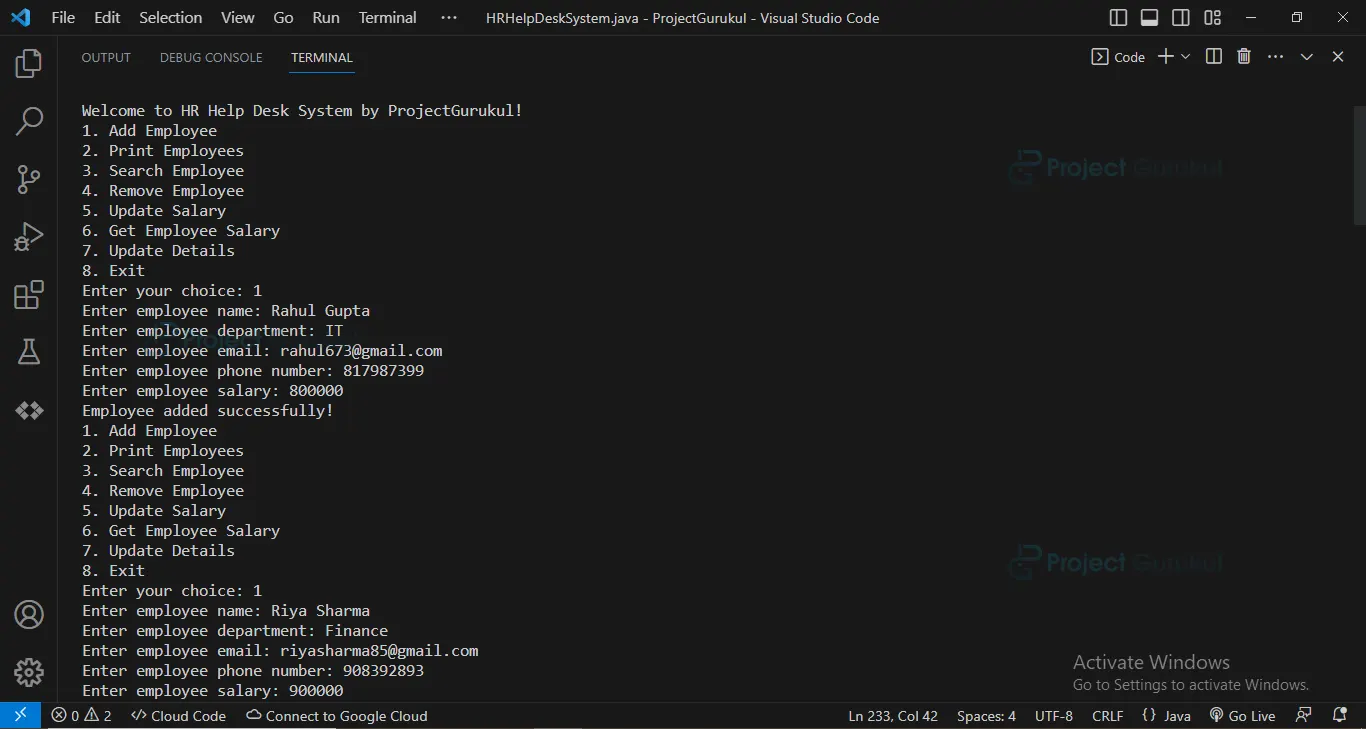
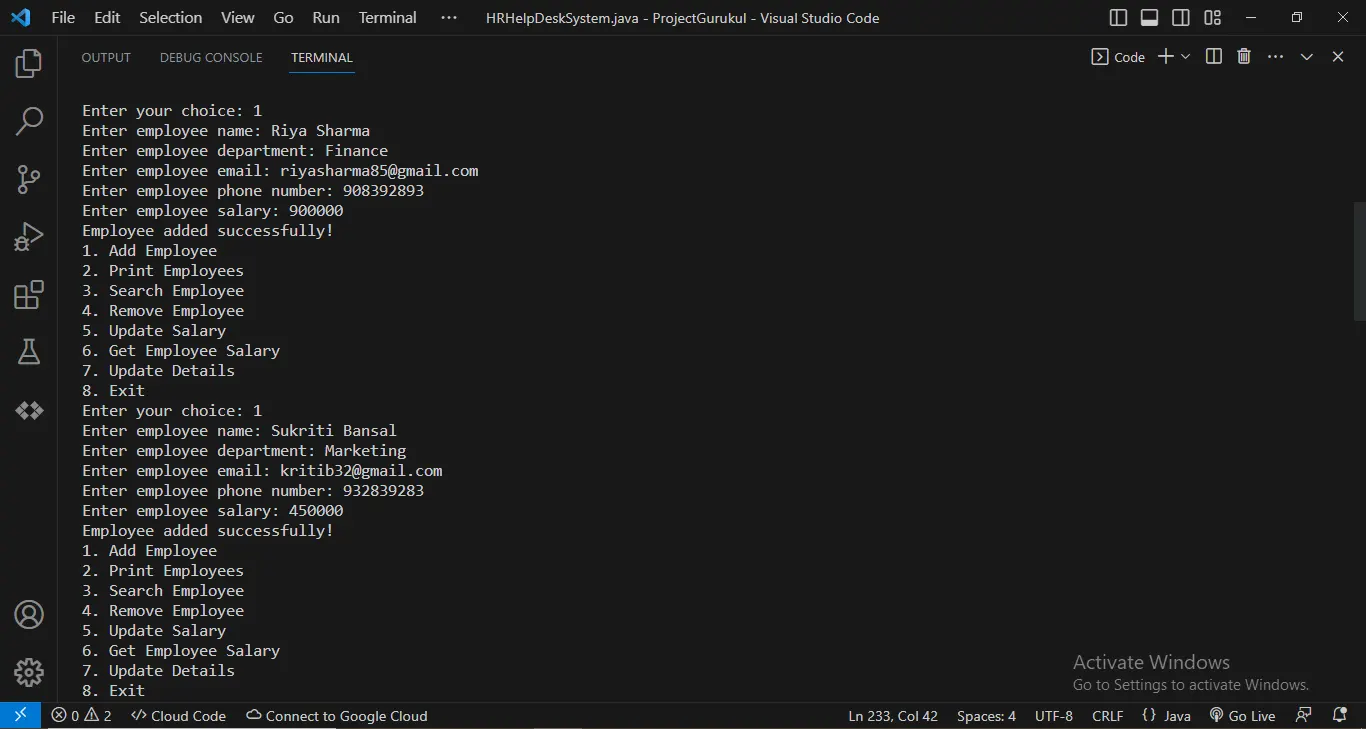
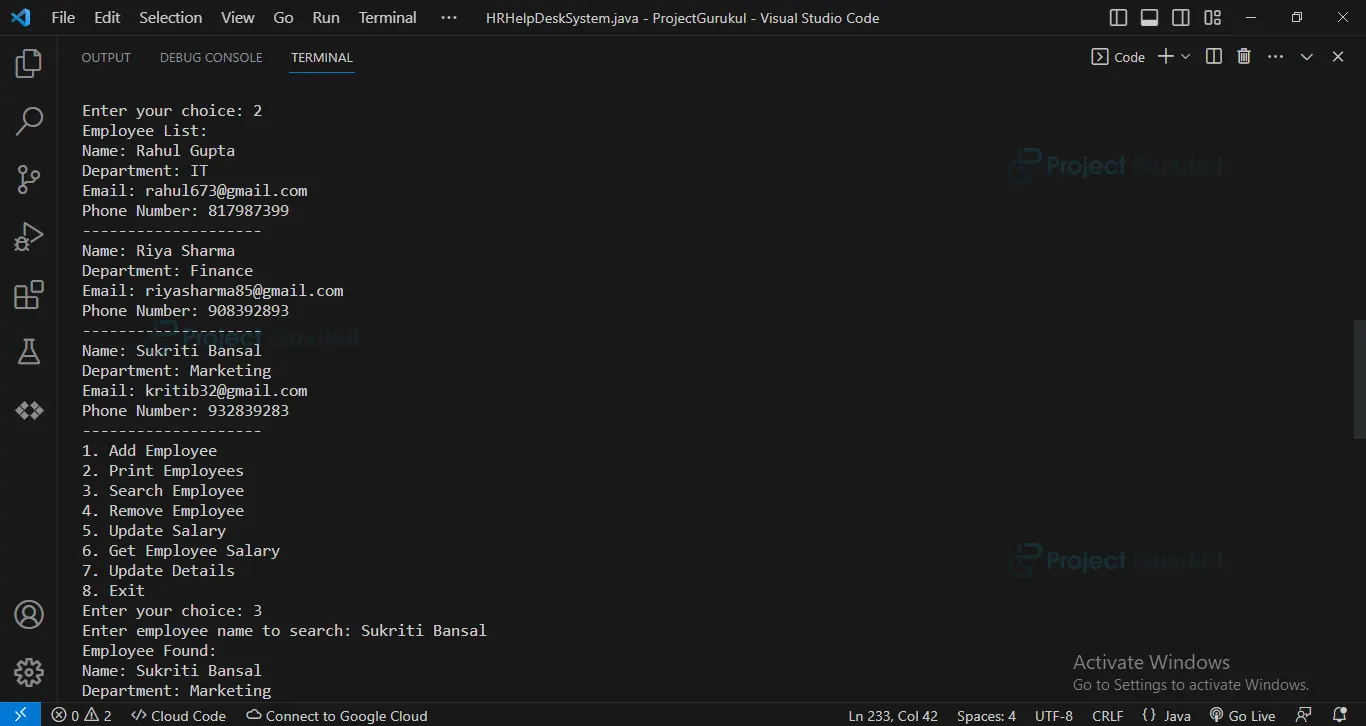
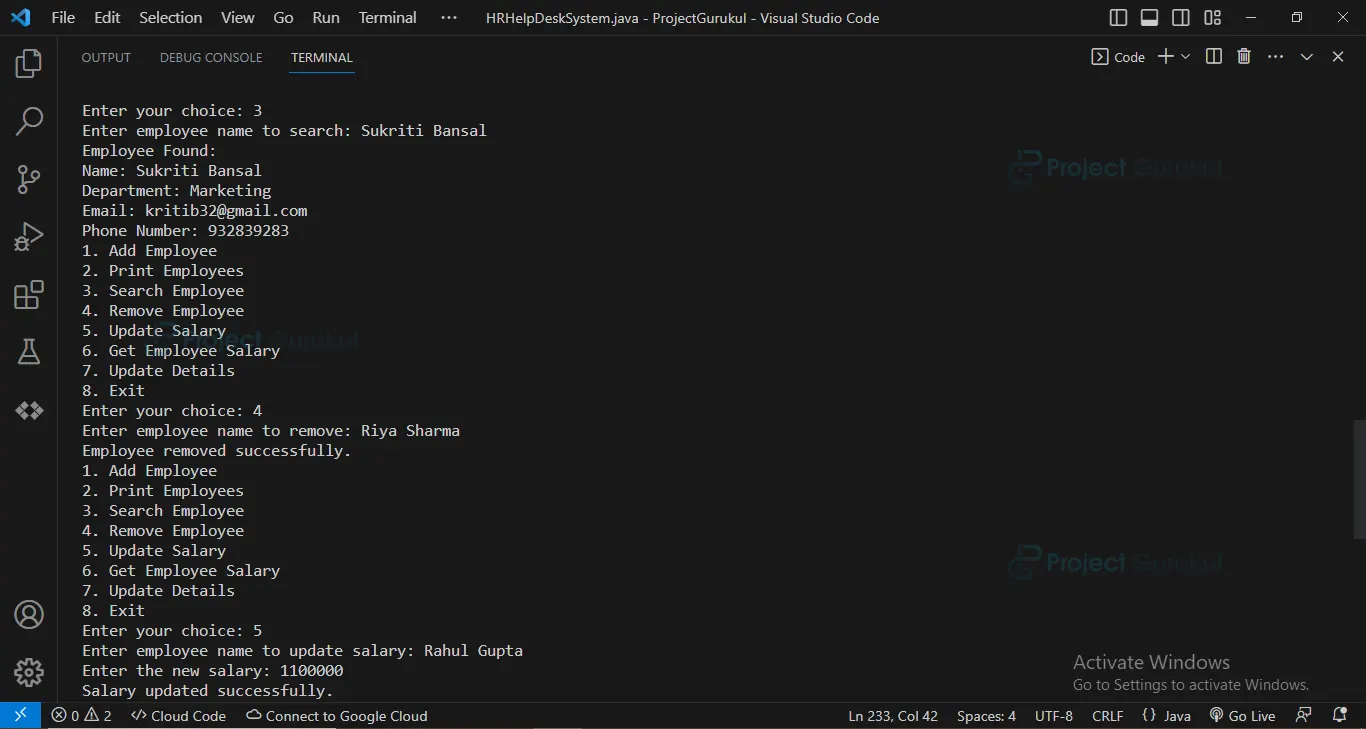
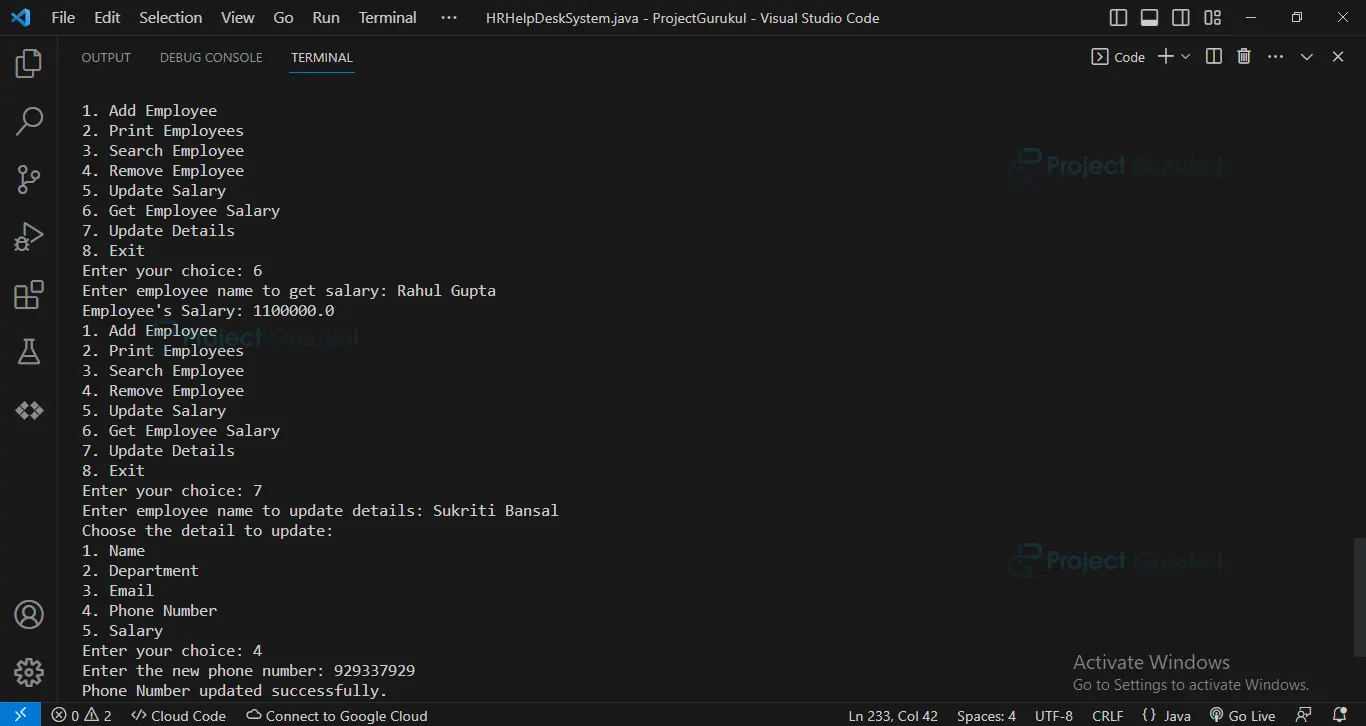
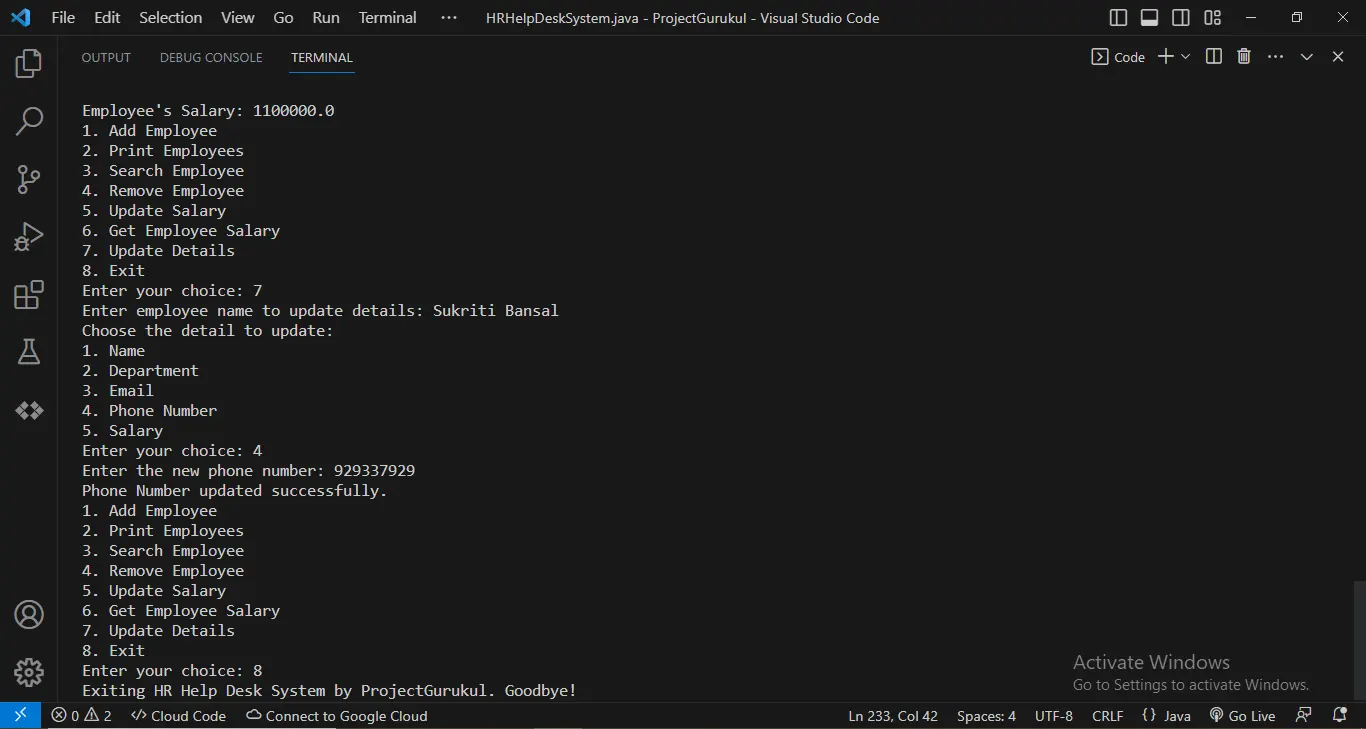
Java HR Help Desk System Output
Conclusion
The HR Help Desk System project in Java offers a comprehensive solution for enhancing HR operations and simplifying employee management processes. Throughout this guide, we have explored the key features and functionalities of this system, gaining valuable insights into its implementation and usage. We hope this guide has been informative and engaging, providing you with valuable insights into the HR Help Desk System project.
Feel free to explore the code, customize the system according to your specific requirements, and confidently continue your Java programming journey. Thank you for joining us on this exciting journey of building and exploring the HR Help Desk System in Java!
I want this project so what’s the price of that project
I have this projects how much paid for this project
I have this projects how much paid to this project