Machine Learning Project – Cotton Plant Disease Prediction
FREE Online Courses: Elevate Skills, Zero Cost. Enroll Now!
Cotton is one of the most economically significant crops worldwide, serving as a primary source of fibre for textile production. However, various diseases often threaten its cultivation, significantly reducing yield and quality. Early detection and management of these diseases are critical for sustainable cotton production.
The Cotton Disease Prediction Project aims to leverage the power of machine learning, specifically deep learning techniques like Convolutional Neural Networks (CNNs), to develop a predictive model capable of identifying common diseases affecting cotton plants. The model can provide farmers with timely insights by analyzing images of diseased and healthy cotton leaves and plants, allowing for proactive disease management strategies. This project aims to empower cotton farmers with a valuable tool to optimize crop health, minimize losses, and ultimately enhance agricultural productivity and livelihoods.
About Dataset
The dataset provided for this project contains various images in three different files; train, test and val. This helps the model recognise whether the cotton plant has a disease.
The link to Dataset can be found CottonDiseaseData
About Machine Learning Cotton Plant Disease Prediction
Data preprocessing is pivotal for developing the Convolutional Neural Network (CNN) in image classification. Using ImageDataGenerator, images undergo rescaling, shearing, zooming, flipping, and shifting to enhance model generalization. The dataset is then split into training, validation, and test sets. The CNN architecture, constructed via TensorFlow’s Keras API, consists of convolutional layers, max-pooling layers, and dropout layers to prevent overfitting, culminating in fully connected layers with ReLU activation and a softmax output layer for multi-class classification. Adam optimizer and categorical cross-entropy loss are employed for CNN compilation and training. Training progress is recorded for analysis, with evaluation conducted on the validation set. Visualization aids in monitoring training and validation accuracy and loss over epochs. For prediction, individual images are preprocessed and passed through the model, with predictions extended to the entire test set to assess the model’s performance comprehensively.
Prerequisites For Machine Learning Cotton Plant Disease Prediction
The code provided requires several technical skills across different domains. Here’s a breakdown of the prerequisites:
1. Python Programming: Proficiency in Python is essential for understanding and writing the code.
2. NumPy and Pandas: These libraries are used for numerical computing and data manipulation. Understanding them is necessary for handling data arrays and dataframes.
3. Matplotlib: Knowledge of Matplotlib is required for data visualization. It’s used here to plot the training/validation accuracy and loss curves.
4. Scikit-learn (sklearn): This library provides various machine learning algorithms and tools. Skills in sklearn are necessary for splitting data (train_test_split), evaluating models (metrics), and potentially preprocessing data in more complex projects.
5. TensorFlow and Keras: Understanding TensorFlow and Keras is crucial for building and training neural networks. TensorFlow is a deep learning framework, and Keras is a high-level API that runs on top of TensorFlow, making it easier to build and train models.
6. Convolutional Neural Networks (CNNs): Familiarity with CNN architecture, including convolutional layers, pooling layers, dropout layers, and dense layers, is essential. This knowledge helps in designing effective neural network architectures for image classification tasks.
7. Image Data Handling: Understanding how to preprocess and handle image data is crucial. This includes using tools like ImageDataGenerator for data augmentation and the image module for loading and preprocessing images.
8. Model Evaluation: Skills in evaluating model performance using appropriate metrics are necessary. In this code, accuracy and loss are used as evaluation metrics, but understanding other metrics like precision, recall, and F1-score can be beneficial.
Download Machine Learning Cotton Plant Disease Prediction Project
Please download the source code of Machine Learning Cotton Plant Disease Prediction Project: Machine Learning Cotton Plant Disease Prediction Project Code.
Tools and libraries used
1. NumPy (np):
- NumPy is a fundamental package for Python numerical computing.
- It supports multi-dimensional arrays and matrices and a collection of mathematical functions to operate on these arrays efficiently.
- It is widely used in scientific computing and data analysis tasks.
2. Pandas (pd):
- Pandas is a powerful data manipulation and analysis library for Python.
- It offers data structures and operations for manipulating structured data and time series. It is particularly useful for data cleaning, exploration, and preparation tasks.
3. Matplotlib.pyplot (plt):
- Matplotlib is a plotting library for Python that provides a MATLAB-like interface for creating static, interactive, and animated visualizations.
- Pyplot is a module within Matplotlib that provides a convenient way to create plots and visualizations.
4. Scikit-learn (sklearn):
- Scikit-learn is a machine-learning library for Python that provides simple and efficient tools for data mining and data analysis.
- It includes various algorithms for classification, regression, clustering, dimensionality reduction, and model selection.
- This code imports train_test_split and metrics modules for splitting datasets and evaluating model performance, respectively.
5. TensorFlow (tf):
- TensorFlow is an open-source machine learning framework developed by Google.
- It provides a comprehensive ecosystem of tools, libraries, and community resources for building and deploying machine learning models.
- This code uses TensorFlow to build and train deep learning models, particularly convolutional neural networks (CNNs).
6. TensorFlow.keras.preprocessing.image:
- This module provides utilities for preprocessing image data, such as loading images from disk, resizing, and applying data augmentation techniques.
7. TensorFlow.keras (Sequential, Conv2D, Dense, Dropout, Flatten, MaxPool2D):
- These are classes and layers provided by the TensorFlow Keras API for building deep learning models.
- Sequential is a model composition class that creates a linear stack of layers.
- Conv2D, Dense, Dropout, Flatten, and MaxPool2D are different layers commonly used in convolutional neural networks.
Steps by Step Code Implementation of ML Cotton Plant Disease Prediction
The provided code performs several tasks related to analyzing and modeling Cotton Disease data. Let’s break down the code and explain each step:
Let’s break down the code into various steps and explain each one:
Step 1: Import Libraries
import numpy as np
import pandas as pd
import matplotlib.pyplot as plt
from sklearn.model_selection import train_test_split
from sklearn.metrics import *
import tensorflow as tf
from tensorflow.keras.preprocessing.image import ImageDataGenerator
from tensorflow.keras import Sequential
from tensorflow.keras.layers import Conv2D, Dense, Dropout, Flatten, MaxPool2D
from tensorflow.keras.preprocessing import image
import warnings
# Set display options
pd.set_option("display.max_columns", None)
pd.set_option("display.max_rows", None)
pd.set_option('display.width', None)
warnings.filterwarnings("ignore")
Importing necessary libraries, including numpy, pandas, and matplotlib, for data manipulation, visualization, and machine learning tasks. TensorFlow and Keras libraries are imported to build and train the CNN model. ImageDataGenerator is imported from TensorFlow Keras for image preprocessing.
Step 2: Data Preprocessing
# Data preprocessing
train_data_generator = ImageDataGenerator(rescale=1.0/255,
                                         shear_range=0.2,
                                         zoom_range=0.2,
                                         horizontal_flip=True,
                                         vertical_flip=True,
                                         rotation_range=20,
                                         width_shift_range=0.2,
                                         height_shift_range=0.2)
train_generator = train_data_generator.flow_from_directory('C:/Users/vaish/Downloads/Cotton Disease Prediction/train',
                                                           target_size=(128, 128),
                                                           batch_size=32,
                                                           class_mode='categorical',
                                                           seed=42,
                                                           shuffle=True)
valid_data_generator = ImageDataGenerator(rescale=1.0/255)
valid_generator = valid_data_generator.flow_from_directory('C:/Users/vaish/Downloads/Cotton Disease Prediction/val',
                                                           target_size=(128, 128),
                                                           batch_size=32,
                                                           class_mode='categorical',
                                                           seed=42,
                                                           shuffle=True)
test_data_generator = ImageDataGenerator(rescale=1.0/255)
test_generator = test_data_generator.flow_from_directory('C:/Users/vaish/Downloads/Cotton Disease Prediction/test',
                                                         target_size=(128, 128),
                                                         batch_size=32,
                                                         class_mode='categorical',
                                                         seed=42,
                                                         shuffle=False)
The code prepares the training, validation, and test datasets using the ImageDataGenerator class. It rescales the image pixel values to the range of [0,1]. It performs data augmentation techniques like shear range, zoom range, horizontal and vertical flips, rotation range, width shift range, and height shift range for the training dataset. The training, validation, and test datasets are loaded from the respective directories.
Step 3: Building the CNN
# Build the CNN
cnn = Sequential()
cnn.add(Conv2D(filters=32, padding='same', kernel_size=3, activation='relu', input_shape=[128, 128, 3]))
cnn.add(MaxPool2D(pool_size=2, strides=2))
cnn.add(Dropout(rate=0.25))
cnn.add(Conv2D(filters=32, padding='same', kernel_size=3, activation='relu'))
cnn.add(Conv2D(filters=64, padding='same', kernel_size=3, activation='relu'))
cnn.add(MaxPool2D(pool_size=2, strides=2))
cnn.add(Dropout(rate=0.25))
cnn.add(Flatten())
cnn.add(Dense(units=128, activation='relu'))
cnn.add(Dense(units=128, activation='relu'))
cnn.add(Dropout(rate=0.25))
cnn.add(Dense(units=4, activation='softmax'))
cnn.summary()
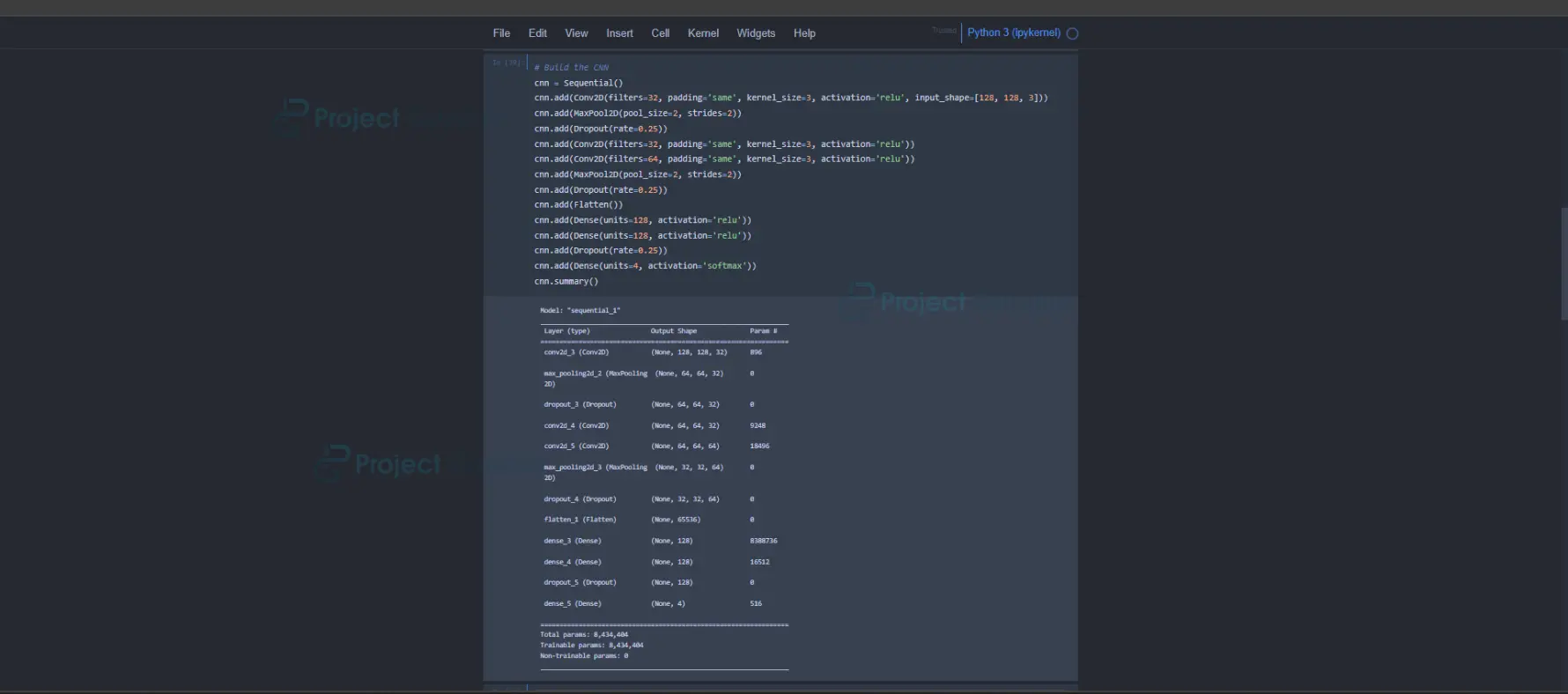
The CNN model is built using the Sequential API from Keras. It starts with a convolutional layer followed by max-pooling and dropout layers, which are repeated for better feature extraction. The flattening layer converts the output of the convolutional layers into a one-dimensional array. Fully connected dense layers are added to perform classification. The output layer has four units (equal to the number of classes) with softmax activation for multi-class classification.
Output:
Step 4: Training the CNN
# Train the CNN
cnn.compile(optimizer='adam', loss='categorical_crossentropy', metrics=['accuracy'])
history = cnn.fit(train_generator, validation_data=valid_generator, epochs=20)
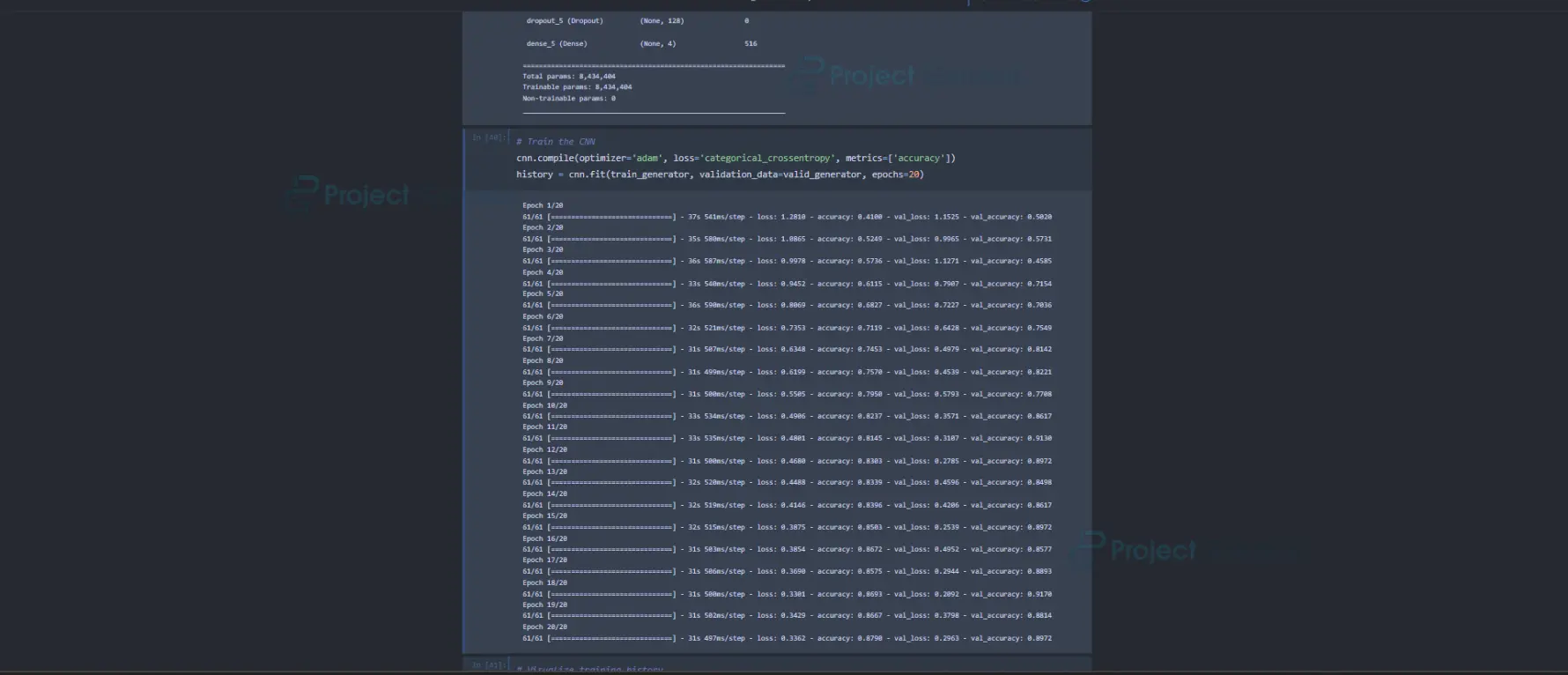
The model is compiled using the Adam optimizer and categorical cross-entropy loss function. The model is trained on the training dataset and evaluated on the validation dataset for 20 epochs. The training history (accuracy and loss) is plotted.
Output:
Step 5: Visualizations
# Plot accuracy
plt.subplot(1, 2, 1)
plt.plot(history.history['accuracy'], label='Train')
plt.plot(history.history['val_accuracy'], label='Validation')
plt.title('Model Accuracy')
plt.xlabel('Epoch')
plt.ylabel('Accuracy')
plt.legend()
# Plot loss
plt.subplot(1, 2, 2)
plt.plot(history.history['loss'], label='Train')
plt.plot(history.history['val_loss'], label='Validation')
plt.title('Model Loss')
plt.xlabel('Epoch')
plt.ylabel('Loss')
plt.legend()

plt.tight_layout()
plt.show()
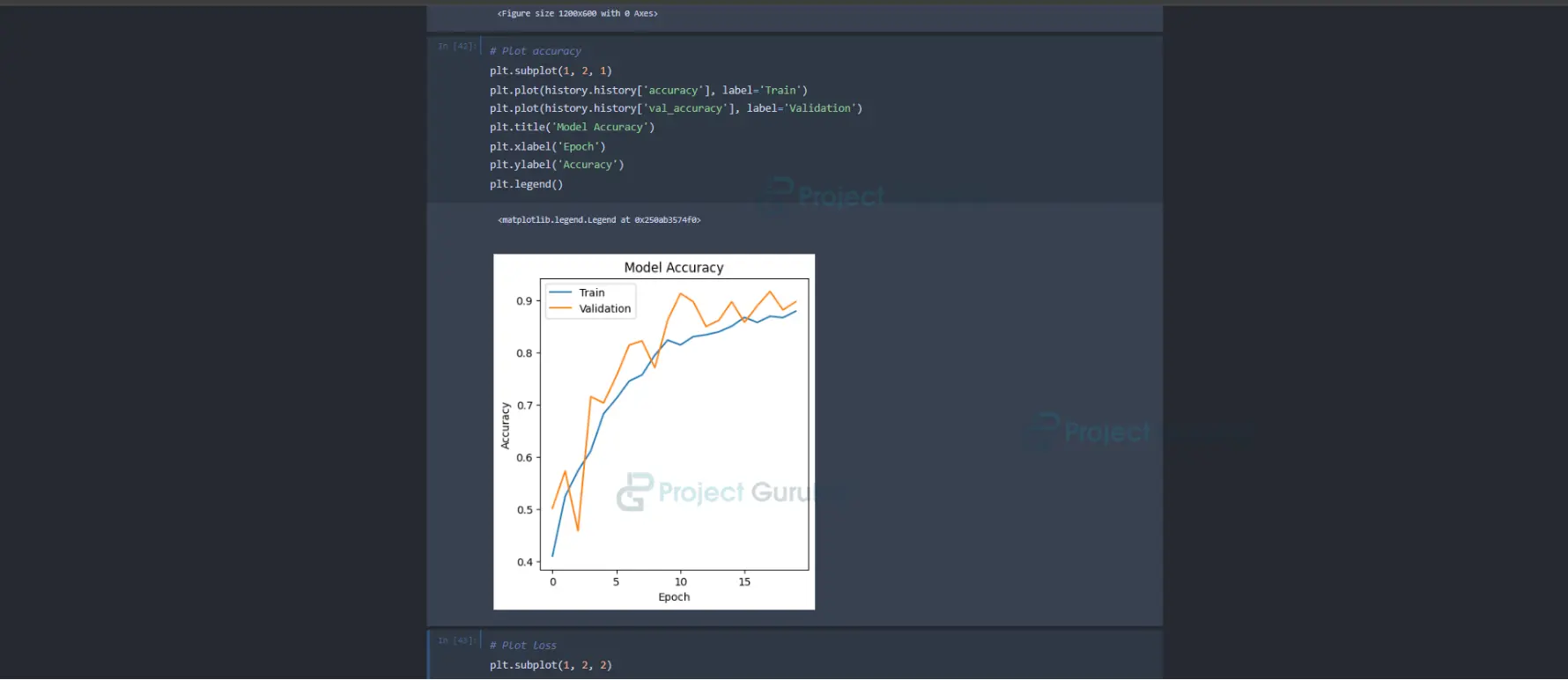
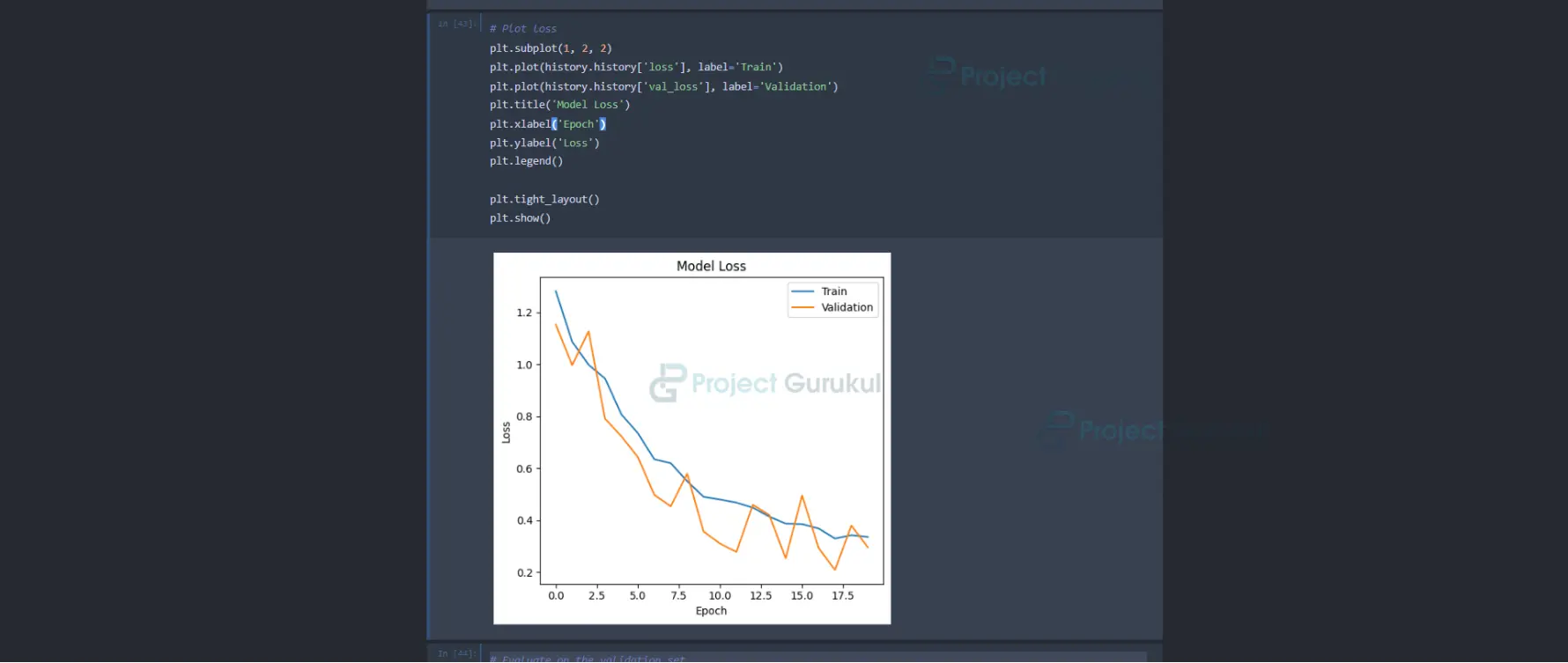
This code segment plots the training and validation accuracy and the training and validation loss across epochs. It utilizes subplots to display accuracy and loss separately. The first subplot plots the training and validation accuracy, labelling the axes appropriately and displaying a legend to differentiate between them. The second subplot does the same for the training and validation loss. Finally, it adjusts the layout to prevent overlapping of subplots and displays the plots. This visualization aids in understanding how the model’s accuracy and loss evolve over the training epochs, facilitating the assessment of model performance.
Output:
Step 6: Evaluation & Prediction
# Evaluate on the validation set
cnn.evaluate(valid_generator)
# Predict on test images
test_image_paths = ['C:/Users/vaish/Downloads/Cotton Disease Prediction/test/fresh cotton leaf/d (133)_iaip.jpg', 'C:/Users/vaish/Downloads/Cotton Disease Prediction/test/fresh cotton leaf/d (133)_iaip.jpg', 'C:/Users/vaish/Downloads/Cotton Disease Prediction/test/diseased cotton plant/dd (885)_iaip.jpg']
pred_labels = []

for path in test_image_paths:
    test_image = image.load_img(path, target_size=(128, 128))
    test_image = image.img_to_array(test_image) / 255.0
    test_image = np.expand_dims(test_image, axis=0)
    result = cnn.predict(test_image)
    pred_labels.append(result.argmax())

print("Predicted Labels:", pred_labels)
# Predict on the entire test set
test_generator.reset()
predictions = cnn.predict(test_generator, verbose=1)
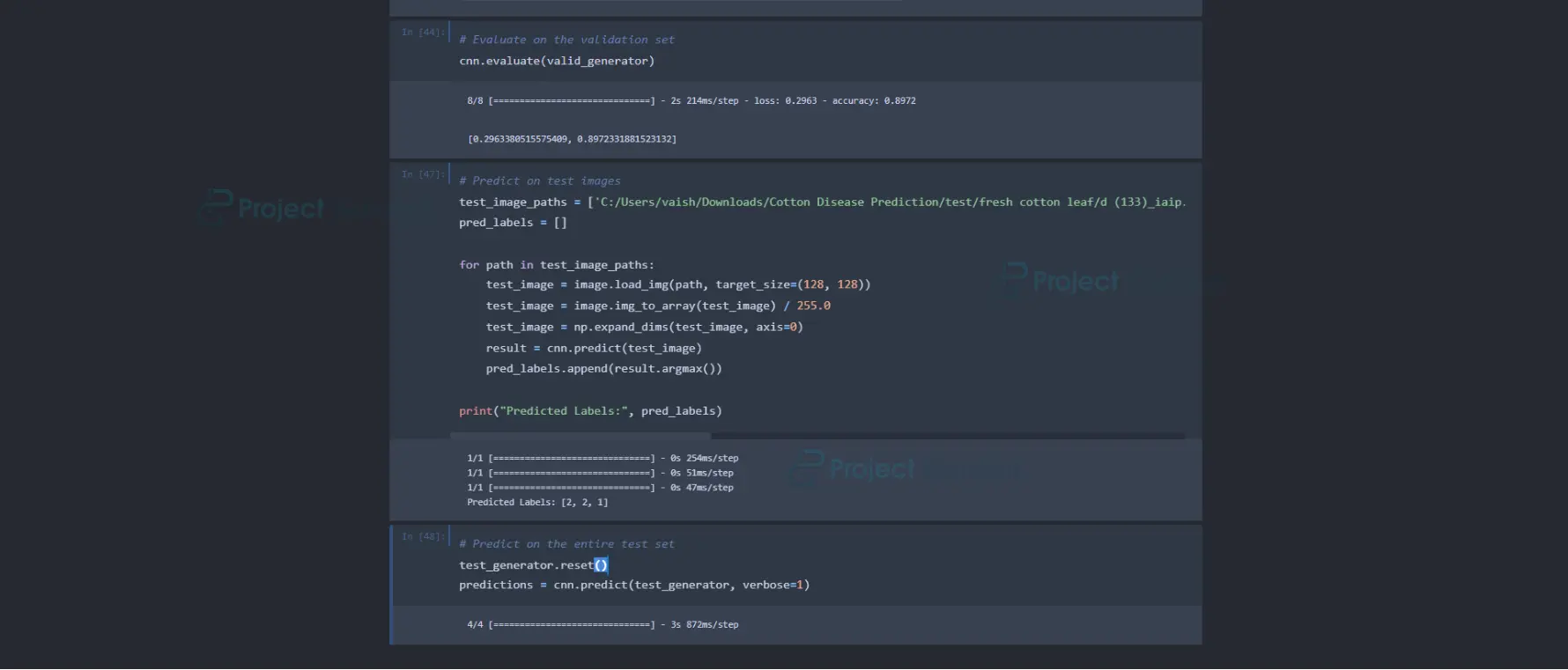
The model is evaluated using the evaluation method on the validation dataset. Finally, some test images are loaded, preprocessed, and passed through the trained model for prediction. The predicted classes are displayed.
Output:
Summary
In conclusion, the Machine Learning Cotton Disease Prediction Project represents a significant step forward in agricultural technology, offering farmers a powerful tool to combat the detrimental effects of diseases on cotton crops. By harnessing machine learning capabilities, particularly Convolutional Neural Networks (CNNs), we have developed a predictive model that accurately identifies common diseases affecting cotton plants based on image analysis.
This Machine Learning Cotton Disease Prediction project holds immense potential to revolutionize how cotton diseases are detected and managed. It enables farmers to make timely and informed decisions to protect their crops and optimize yields. Further refinement and validation of the model and integration into user-friendly platforms will be essential to ensure widespread adoption and impact within the agricultural community.
Ultimately, the Cotton Disease Prediction Project stands as a testament to technology’s transformative potential in addressing real-world challenges and advancing sustainable farming practices.
You can check out more such machine learning projects on ProjectGurukul.
very Nice
very good
good
Can you give me access to buy with detailed whole project