Python Project – Automatic Birthday Mail Sender
FREE Online Courses: Your Passport to Excellence - Start Now
The Birthday Mail Sending Automation project aims to automate sending birthday greetings via email to individuals based on their birthdates stored in an Excel spreadsheet. This Python-based application uses Gmail’s SMTP server for email delivery and ensures personalized messages are sent on the recipients’ birthdays.
About Python Automatic Birthday Mail Sender Project
The project utilizes Python programming to read birthdate data from an Excel file, match it with the current date, and send birthday messages via email using Gmail’s SMTP server. It demonstrates the application of scripting and email handling in real-world scenarios.
Objectives of Python Automatic Birthday Mail Sender Project
- Develop a project that reads birth dates from an Excel file and compares them with the current date.
- Implement an email sending using Gmail’s SMTP server.
- Ensure personalized birthday messages are delivered accurately and timely.
Project Setup
Required Libraries
The project requires the following standard Python libraries:
- Pandas: For reading and manipulating data from Excel.
- smtplib: For sending emails via SMTP.
- datetime: For date manipulation and comparison.
- EmailMessage: For creating and formatting email messages.
Technology Stack
- Python
- Pandas
- smtplib
- Gmail SMTP server
Prerequisites of Python Automatic Birthday Mail Sender
Basic understanding of Python programming.
Understanding of SMTP and Google Cloud.
Download Python Automatic Birthday Mail Sender Project
Please download the source code of the Python Automatic Birthday Mail Sender Project: Python Automatic Birthday Mail Sender Project Code.
Implementation of Python Automatic Birthday Mail Sender Project
1. Importing Libraries
- This segment imports various libraries necessary for different functionalities, such as handling HTTP requests, working with Excel files, managing Google OAuth credentials, building Gmail API service, creating email messages, encoding data, and handling dates.
- Google OAuth2 and Gmail API: Essential for authenticating and interacting with Gmail to send emails. SCOPES defines the permission scope required, in this case, to send emails.
from urllib.request import Request
import pandas as pd
from google.oauth2.credentials import Credentials
from google_auth_oauthlib.flow import InstalledAppFlow
from googleapiclient.discovery import build
from email.mime.multipart import MIMEMultipart
from email.mime.text import MIMEText
import base64
import os
from datetime import datetime
2. Credentials
- This function first checks if token.json exists, which stores previously obtained credentials.
- If token.json exists, it loads the credentials. If the credentials are expired, it attempts to refresh them.
- If credentials are not available or valid, it initiates an OAuth flow using InstalledAppFlow, which prompts the user to authorize access.
- The new credentials are then saved to token.json.
def get_credentials():
   creds = None
   if os.path.exists('token.json'):
       creds = Credentials.from_authorized_user_file('token.json', SCOPES)
   if not creds or not creds.valid:
       if creds and creds.expired and creds.refresh_token:
           creds.refresh(Request())
       else:
           flow = InstalledAppFlow.from_client_secrets_file(
               'credentials.json', SCOPES)
           creds = flow.run_local_server(port=8080)
       with open('token.json', 'w') as token:
           token.write(creds.to_json())
   return creds
3. Reading Data from Excel
- It reads Excel data using pandas.read_excel
- Openpyxl Engine: Specifies openpyxl as the engine to read .xlsx files.
- Then it returns the read data as a pandas DataFrame for further processing.
def read_excel_data(file_path):
   df = pd.read_excel(file_path, engine='openpyxl')
   return df


   result_label = tk.Label(root, text="")
   result_label.grid(row=len(labels)+1, column=0, columnspan=2)
   root.mainloop()
4. Create and Send Mail
- This function creates a MIME email message with sender, recipient, subject, and HTML body.
- MIME uses MIMEMultipart and MIMEText to build the email structure.
- The message is encoded in base64 format suitable for Gmail API.
- Then, the mail is sent using the Gmail API, which handles potential errors.
def create_message(sender, to, subject, message_text):
   message = MIMEMultipart()
   message['to'] = to
   message['from'] = sender
   message['subject'] = subject
   msg = MIMEText(message_text, 'html')
   message.attach(msg)
   return {'raw': base64.urlsafe_b64encode(message.as_bytes()).decode()}


def send_message(service, user_id, message):
   try:
       message = service.users().messages().send(userId=user_id, body=message).execute()
       print(f"Message Id: {message['id']}")
       return message
   except Exception as error:
       print(f"An error occurred: {error}")
5. Running Main Function
- This function reads the Excel file containing birthday data into a DataFrame.
- It obtains Gmail API credentials and builds the service object.
- It also filters the DataFrame for today’s birthdays and sends emails to each recipient.
def main():
   excel_file = 'data.xlsx'
   df = read_excel_data(excel_file)


   creds = get_credentials()
   service = build('gmail', 'v1', credentials=creds)


   sender_email = '' # write senders email address here
   subject = 'Happy Birthday! From ProjectGurukul'
   message_text = """
   <html>
   <body>
       <p>Dear recipient,</p>
       <p>Happy Birthday! Wishing you a day filled with joy, laughter, and unforgettable memories!</p>
       <p>Best regards,</p>
       <p>Your Name</p>
   </body>
   </html>
   """


   today_date = datetime.now().strftime('%m-%d')
   today_birthdays = df[df['Birthday'].dt.strftime('%m-%d') == today_date]


   if not today_birthdays.empty:
       for index, row in today_birthdays.iterrows():
           recipient_email = row['Email']
           message = create_message(sender_email, recipient_email, subject, message_text)
           send_message(service, 'me', message)
           print(f"Sent birthday email to {recipient_email}")
   else:
       print("No birthdays match today's date.")


if __name__ == '__main__':
   main()
NOTE:-
- Edit the Excel file’s Birthday column to Year-Month-Date format.
- Change the sender_email and message details as needed.
- Ensure the credentials.json file is configured and placed in the script directory.
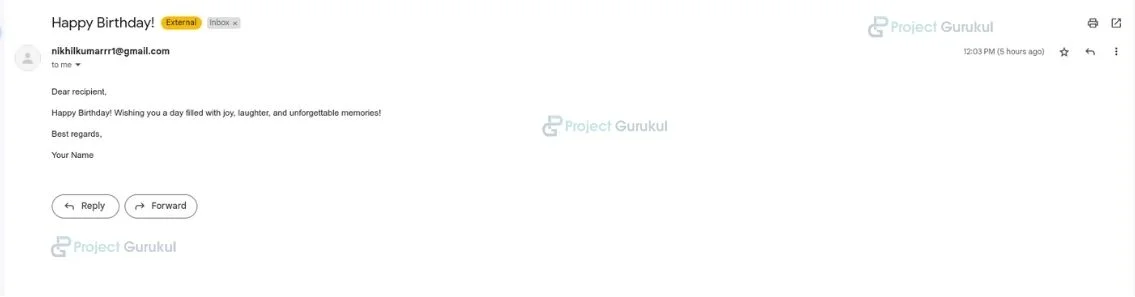
Python Automatic Birthday Mail Sender Project Output
Conclusion
The Birthday Email Sender project automates sending personalized birthday greetings via email using Python. It reads recipient data from an Excel file and integrates with the Gmail API for secure email delivery. The project ensures timely wishes for the person by matching the current date with the recipients’ birthdays.