React Project – Tic Tac Toe Game
FREE Online Courses: Enroll Now, Thank us Later!
Tic-tac-toe is a classic game loved by people all over the world. It’s also known as noughts and crosses. Its origins are shrouded in mystery, but its simplicity and engaging nature have made it a generation’s favourite pastime. Played on a grid, typically a three-by-three square, opponents take turns placing their marks, usually X’s and O’s, to create a row of their symbols horizontally, vertically, or diagonally.
Despite its straightforward rules, tic-tac-toe offers a blend of strategy and luck, making each game unique. Draws are common, but the thrill of achieving victory is ever-present. Whether played on paper, carved into wood, or on a digital device, tic-tac-toe brings joy and friendly competition to people of all ages. To play tic-tac-toe, two players place their symbol (X or O) on a 3×3 grid, aiming to get three symbols in a row horizontally, vertically, or diagonally while preventing their opponent from doing so.
About React Tic Tac Toe Game
A Tic-Tac-Toe Game using React involves building web applications using a JavaScript library that facilitates the creation of user interfaces. React allows developers to create reusable components that manage their state, making it easier to build complex UIs. With React, developers can efficiently update and render components when data changes, enhancing performance and user experience. It integrates seamlessly with other JavaScript libraries and frameworks, allowing for flexibility in development.
React’s ecosystem offers a wide range of tools, such as React Router for navigation and Redux for state management, enhancing its capabilities. Additionally, React’s declarative syntax simplifies the process of building interactive user interfaces, as developers can describe how the UI should look at any given point in time, and React updates it accordingly.
Using React, Tic Tac Toe Game empowers developers to create dynamic and responsive web applications efficiently, offering a modern and robust solution for building interactive user interfaces.
Prerequisite For React Tic Tac Toe Game
- React
- API Integration
- Knowledge of HTML and CSS
- Javascript is essential to know.
- Knowledge of function-based programming
Download React Tic Tac Toe Game Project
Please download the React Tic Tac Toe Project’s source code from the following link: React Tic Tac Toe Project Code.
About installation steps
Download Visual Studio
You can choose the appropriate installer for your operating system (Windows, macOS, or Linux) on the download page. Once it is installed, please follow the following steps.
For the installation of React, I have explained some of the steps as follows:
1. The first step is to download the node ( as it will help to install react):
2. Now, check the version of the node in Windows by following the command on the terminal:
node --version or node -V
Also, check the npm version using the following command, as it is a tool to download the react
npm --version
3. Now, create one folder on the desktop as react, open the terminal inside the react app, and go to the react folder using the following command as `cd react` and run the command:
npm init react-app tic tac toe
4. cryptoapp is created, go inside the cryptoapp folder using the command `cd cryptoapp` and then npm starts and boom react will run the browser.
Your app react has been successfully installed, so let’s move towards project building.
Steps to create the React Tic Tac Toe Game project
1. This code uses React and a special tool called useState from the React library. It also includes a style file called ‘TicTacToe.css’.
import React, { useState } from 'react';
import './TicTacToe.css';
2. This function component defines a TicTacToe game board using state variables to manage the board’s state, track the current player, and determine the winner.
const TicTacToe = () => {
  const [board, setBoard] = useState(Array(9).fill(null));
  const [xIsNext, setXIsNext] = useState(true);
  const [winner, setWinner] = useState(null);
3. This function handles the click event on the game board, updating the board state with the current player’s symbol if the game is not over, then toggling the player and checking for a winner.
const handleClick = (index) => {
    if (winner || board[index]) return;

    const newBoard = [...board];
    newBoard[index] = xIsNext ? 'X' : 'O';
    setBoard(newBoard);
    setXIsNext(!xIsNext);
    calculateWinner(newBoard);
  };
4. This function checks the game board to determine if any player has won by comparing the board configuration to possible winning combinations stored in ‘lines’.
const calculateWinner = (board) => {
    const lines = [
      [0, 1, 2],
      [3, 4, 5],
      [6, 7, 8],
      [0, 3, 6],
      [1, 4, 7],
      [2, 5, 8],
      [0, 4, 8],
      [2, 4, 6],
    ];
5. This loop iterates through all possible winning combinations stored in ‘lines’. It checks if the symbols in the board at the positions specified by each combination are identical. If a winning combination is found, it sets the winner state to the symbol that has won.
for (let i = 0; i < lines.length; i++) {
      const [a, b, c] = lines[i];
      if (board[a] && board[a] === board[b] && board[a] === board[c]) {
        setWinner(board[a]);
        return;
      }
    }
6. This condition checks if there are no more empty squares on the board, declaring a draw if true.
if (!board.includes(null)) {
      setWinner('Draw');
    }
  };
7. This function returns a button element representing a square on the game board. A click event handler calls the handleClick function, passing the square’s index, and displays the corresponding symbol from the board array.
const renderSquare = (index) => {
    return (
      <button className="square" onClick={() => handleClick(index)}>
        {board[index]}
      </button>
    );
  };
8. This function resets the game state, initializing the board with empty squares, clearing the winner status, and setting the next player to ‘X’.
const resetGame = () => {
    setBoard(Array(9).fill(null));
    setWinner(null);
    setXIsNext(true);
  };
9. These JSX elements display the current game status, showing the winner if there is one or indicating the next player if the game is ongoing. They also render the game board using the renderSquare function for each square.
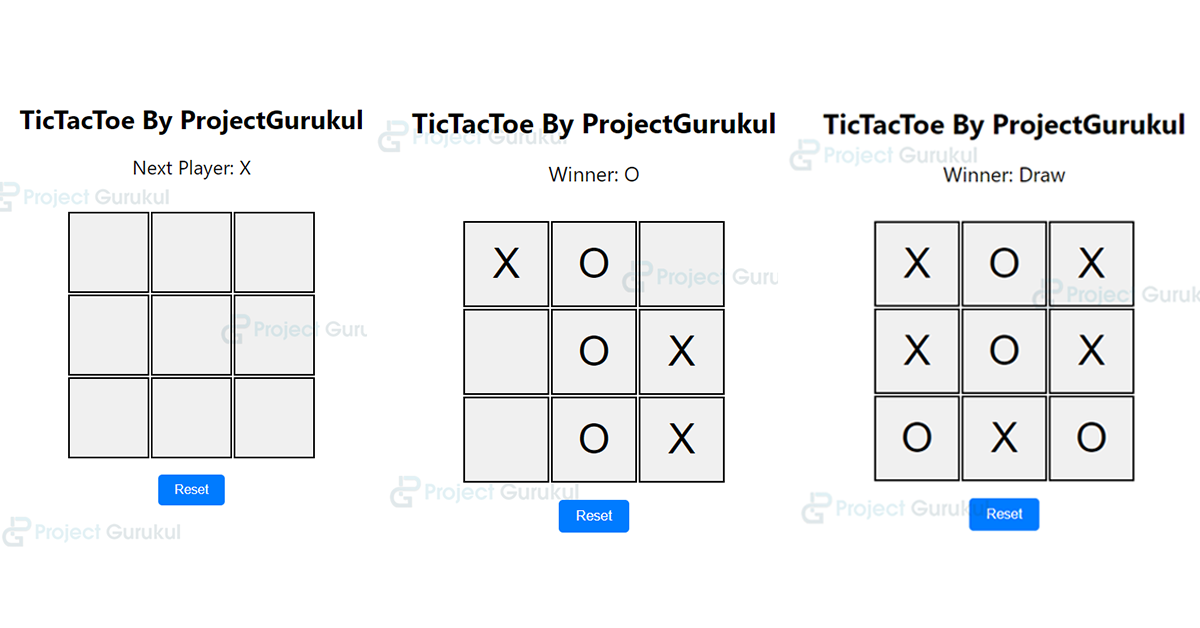
<div className="status">{winner ? `Winner: ${winner}` : `Next Player: ${xIsNext ? 'X' : 'O'}`}</div>
      <div className="board">
        {board.map((square, index) => (
          <div key={index} className="square-container">
            {renderSquare(index)}
          </div>
        ))}
</div>
10. This JSX element creates a button with an onClick event handler that triggers the resetGame function when clicked, styled with a class ‘reset-btn’.
<button onClick={resetGame} className="reset-btn">Reset</button>
Here is the complete code of the above explanation:
Dashboard > index.js
import React, { useState } from 'react';
import './TicTacToe.css';

const TicTacToe = () => {
  const [board, setBoard] = useState(Array(9).fill(null));
  const [xIsNext, setXIsNext] = useState(true);
  const [winner, setWinner] = useState(null);

  const handleClick = (index) => {
    if (winner || board[index]) return;

    const newBoard = [...board];
    newBoard[index] = xIsNext ? 'X' : 'O';
    setBoard(newBoard);
    setXIsNext(!xIsNext);
    calculateWinner(newBoard);
  };

  const calculateWinner = (board) => {
    const lines = [
      [0, 1, 2],
      [3, 4, 5],
      [6, 7, 8],
      [0, 3, 6],
      [1, 4, 7],
      [2, 5, 8],
      [0, 4, 8],
      [2, 4, 6],
    ];

    for (let i = 0; i < lines.length; i++) {
      const [a, b, c] = lines[i];
      if (board[a] && board[a] === board[b] && board[a] === board[c]) {
        setWinner(board[a]);
        return;
      }
    }

    if (!board.includes(null)) {
      setWinner('Draw');
    }
  };

  const renderSquare = (index) => {
    return (
      <button className="square" onClick={() => handleClick(index)}>
        {board[index]}
      </button>
    );
  };

  const resetGame = () => {
    setBoard(Array(9).fill(null));
    setWinner(null);
    setXIsNext(true);
  };

  return (
    <div className="tic-tac-toe">
      <h1>TicTacToe By ProjectGurukul</h1>
      <div className="status">{winner ? `Winner: ${winner}` : `Next Player: ${xIsNext ? 'X' : 'O'}`}</div>
      <div className="board">
        {board.map((square, index) => (
          <div key={index} className="square-container">
            {renderSquare(index)}
          </div>
        ))}
      </div>
      <button onClick={resetGame} className="reset-btn">Reset</button>
    </div>
  );
};

export default TicTacToe;
Dashboard > TicTacToe.css
.tic-tac-toe {
    text-align: center;
    margin-top: 50px;
  }

  .board {
    display: grid;
    grid-template-columns: repeat(3, 100px);
    grid-template-rows: repeat(3, 100px);
    gap: 2px;
    margin: 20px auto;
  }

  .square-container {
    display: flex;
    align-items: center;
    justify-content: center;
  }

  .square {
    width: 100px;
    height: 100px;
    font-size: 3em;
    border: 2px solid #000;
    cursor: pointer;
  }

  .square:hover {
    background-color: #f0f0f0;
  }

  .status {
    font-size: 1.5em;
    margin-bottom: 20px;
  }

  .reset-btn {
    padding: 10px 20px;
    font-size: 1em;
    background-color: #007bff;
    color: #fff;
    border: none;
    cursor: pointer;
    border-radius: 5px;
    margin-inline: auto;
  }

  .reset-btn:hover {
    background-color: #0056b3;
  }

  .tic-tac-toe {
    display: flex;
    justify-content: center;
    flex-direction: column;
  }
React Tic Tac Toe Game Output
Conclusion
Implementing Tic-Tac-Toe in React demonstrates the library’s power and flexibility in creating interactive web applications. We built a functional and engaging game using state management with useState, event handling, and conditional rendering. React’s component-based architecture allowed us to modularize the game’s elements, promoting code reusability and maintainability. The useState hook facilitated the management of game state variables such as the board, current player, and winner status. Additionally, using JSX to render UI elements provided a familiar and intuitive syntax for developers.
Through this project, we’ve explored how React simplifies the development process by abstracting away the complexities of DOM manipulation and offering a declarative approach to building user interfaces. The combination of React’s features empowers developers to create dynamic and responsive applications efficiently, making it a popular choice for web development projects of all scales and complexities.
Dear,
I could not download the source code. Is the link broken?