Java Project – Student Project Allocation and Management
FREE Online Courses: Elevate Your Skills, Zero Cost Attached - Enroll Now!
Welcome to an exciting chapter in education, where student projects take centre stage and pave the way for transformative learning experiences. We understand the importance of hands-on learning, critical thinking, and skill development in shaping the future of our students.
However, assigning students to projects has often been time-consuming and daunting for educational institutions, hindering the potential for optimal outcomes. But fret no more! We are thrilled to introduce you to the game-changing solution that will revolutionize student project allocation and management.
Say hello to the Student Project Allocation and Management Project—a powerful tool that simplifies the process, empowering institutions to match students with projects based on their preferences, skills, and project requirements. Together, let us embrace this exciting project allocation and management era, where simplicity meets interactivity. Let’s embark on this remarkable adventure together!
About Java Student Project Allocation and Management
The allocation of projects to students is based on a simple preference-based algorithm implemented in the allocateProjects() method. It goes through each student and their preferences and assigns the first available project that matches their preference and has available capacity. The allocation is done successively without considering any additional factors or fairness criteria.
We will implement the following functionalities in the Java Student Project Allocation and Management Project :
1. We will have a “Student” class that will represent a student participating in the project allocation. It will have attributes for the student’s name, preferences (a list of project names), and the allocated project. The class will provide getter methods to access these attributes and a method to assign a project to the student.
2. We will also have a “Project” class representing a project available for allocation. It will have attributes for the project’s name, capacity (the maximum number of students that can be allocated to the project), and a list of allocated students. The class will provide getter methods to access these attributes and a method to add a student to the project’s list of allocated students.
3. Our “ProjectAllocationManager” class will act as the central coordinator for the project allocation process. It will have attributes for the lists of students and projects and a scanner object for user input. We will provide methods to add students and projects to the system, allocate projects to students based on their preferences and capacity, display students’ allocation to projects, and find a project by its name.
Additionally, we will include a method to collect user input to specify the number of students and projects and their details. In the primary process, we will create an instance of the “ProjectAllocationManager,” get user input, allocate projects, and display the allocation.
Our project allocation management system will simplify assigning projects to students, considering their preferences and optimizing the allocation based on project capacities.
Prerequisites for Java Student Project Allocation and Management
To write and run the Student Project Allocation and Management Project code, the following prerequisites are required:
1. Basic understanding of the Java programming language, including knowledge of loops, conditional statements, and object-oriented programming concepts.
2. Familiarity with array data structures and Java. util package, which provides utility classes like Random and Arrays.
3. A working Java development environment includes installing the Java Development Kit (JDK) on your computer. You can download the JDK from the official Oracle website or use a package manager specific to your operating system.
4. An Integrated Development Environment (IDE) like IntelliJ IDEA, Eclipse, or NetBeans can greatly simplify Java development. Choose an IDE you are comfortable with and set it up.
Download Java Student Project Allocation and Management Project Code
Please download the source code of the Java Student Project Allocation and Management Project: Java Student Project Allocation and Management Project Code.
Code Breakdown
1. Student Class:
- The Student class represents a student participating in the project allocation system.
- It has private attributes for the student’s name, preferences, and allocated project.
- The constructor initializes the attributes and sets the allocated project to null.
- Getter methods are provided to access the student’s name, preferences, and allocated project.
- The allocateProject() method assigns a project to the student.
class Student {
    private String name;
    private List<String> preferences;
    private Project allocatedProject;

    // Student constructor
    public Student(String name, List<String> preferences) {
        this.name = name;
        this.preferences = preferences;
        this.allocatedProject = null;
    }

    // Getter methods
    public String getName() {
        return name;
    }

    public List<String> getPreferences() {
        return preferences;
    }

    public Project getAllocatedProject() {
        return allocatedProject;
    }

    // Method to allocate a project to the student
    public void allocateProject(Project project) {
        this.allocatedProject = project;
    }
}
2. Project Class:
- The Project class represents a project available for allocation.
- It has private attributes for the project’s name, capacity, and a list of allocated students.
- The constructor initializes the attributes and creates an empty list of allocated students.
- Getter methods are provided to access the project’s name, capacity, and list of allocated students.
- The addAllocatedStudent() method adds a student to the list of allocated students for the project.
class Project {
    private String name;
    private int capacity;
    private List<Student> allocatedStudents;

    // Project constructor
    public Project(String name, int capacity) {
        this.name = name;
        this.capacity = capacity;
        this.allocatedStudents = new ArrayList<>();
    }

    // Getter methods
    public String getName() {
        return name;
    }

    public int getCapacity() {
        return capacity;
    }

    public List<Student> getAllocatedStudents() {
        return allocatedStudents;
    }

    // Method to add a student to the project's list of allocated students
    public void addAllocatedStudent(Student student) {
        allocatedStudents.add(student);
    }
}
3. ProjectAllocationManager Class:
- The ProjectAllocationManager class is the central coordinator for the project allocation process.
- It has private attributes for the lists of students and projects and a scanner object for user input.
- The constructor initializes the attributes.
- The addStudent() and addProject() methods add students and projects to the system.
- The allocateProjects() method allocates projects to students based on their preferences and project capacity.
- The display allocation () method shows the allocation of students to projects.
- The findProjectByName() method helps find a project in the list of projects based on its name.
- The getUserInput() method collects user input to specify the number of students and projects and their details.
- The main() method creates an instance of ProjectAllocationManager, gets user input, allocates projects, and displays the allocation.
public class ProjectAllocationManager {
    private List<Student> students;
    private List<Project> projects;
    private Scanner scanner;

    // ProjectAllocationManager constructor
    public ProjectAllocationManager() {
        students = new ArrayList<>();
        projects = new ArrayList<>();
        scanner = new Scanner(System.in);
    }

    // Method to add a student to the list of students
    public void addStudent(Student student) {
        students.add(student);
    }

    // Method to add a project to the list of projects
    public void addProject(Project project) {
        projects.add(project);
    }

    // Method to allocate projects to students based on their preferences
    public void allocateProjects() {
        for (Student student : students) {
            for (String preference : student.getPreferences()) {
                // Find the project with the given preference
                Project project = findProjectByName(preference);
                // If the project exists and has available capacity, allocate it to the student
                if (project != null && project.getAllocatedStudents().size() < project.getCapacity()) {
                    student.allocateProject(project);
                    project.addAllocatedStudent(student);
                    break; // Stop searching for preferences once a project is allocated
                }
            }
        }
    }

    // Method to display the allocation of students to projects
    public void displayAllocation() {
        for (Project project : projects) {
            System.out.println("Project: " + project.getName());
            System.out.println("Allocated Students:");
            for (Student student : project.getAllocatedStudents()) {
                System.out.println("- " + student.getName());
            }
            System.out.println();
        }
    }

    // Method to find a project by its name
    private Project findProjectByName(String name) {
        for (Project project : projects) {
            if (project.getName().equals(name)) {
                return project;
            }
        }
        return null;
    }

    // Method to get user input for students and projects
    public void getUserInput() {
        System.out.println("Welcome to the Project Allocation Manager by ProjectGurukul!");
        System.out.println("Please enter the number of students:");
        int numStudents = scanner.nextInt();
        scanner.nextLine(); // Consume the newline character

        for (int i = 0; i < numStudents; i++) {
            System.out.println("\nEnter the details for Student " + (i + 1) + ":");
            System.out.print("Name: ");
            String name = scanner.nextLine();
            System.out.print("Number of preferences: ");
            int numPreferences = scanner.nextInt();
            scanner.nextLine(); // Consume the newline character

            List<String> preferences = new ArrayList<>();
            for (int j = 0; j < numPreferences; j++) {
                System.out.print("Preference " + (j + 1) + ": ");
                String preference = scanner.nextLine();
                preferences.add(preference);
            }

            Student student = new Student(name, preferences);
            addStudent(student);
        }

        System.out.println("\nPlease enter the number of projects:");
        int numProjects = scanner.nextInt();
        scanner.nextLine(); // Consume the newline character

        for (int i = 0; i < numProjects; i++) {
            System.out.println("\nEnter the details for Project " + (i + 1) + ":");
            System.out.print("Name: ");
            String name = scanner.nextLine();
            System.out.print("Capacity: ");
            int capacity = scanner.nextInt();
            scanner.nextLine(); // Consume the newline character

            Project project = new Project(name, capacity);
            addProject(project);
        }
    }

    public static void main(String[] args) {
        // Create a ProjectAllocationManager instance, get user input, allocate projects, and display the allocation
        ProjectAllocationManager manager = new ProjectAllocationManager();
        manager.getUserInput();
        manager.allocateProjects();
        System.out.println("\nProject allocation:");
        manager.displayAllocation();
    }
}
Code to illustrate the Java Student Project Allocation and Management Project
import java.util.*;
class Student {
    private String name;
    private List<String> preferences;
    private Project allocatedProject;

    // Student constructor
    public Student(String name, List<String> preferences) {
        this.name = name;
        this.preferences = preferences;
        this.allocatedProject = null;
    }

    // Getter methods
    public String getName() {
        return name;
    }

    public List<String> getPreferences() {
        return preferences;
    }

    public Project getAllocatedProject() {
        return allocatedProject;
    }

    // Method to allocate a project to the student
    public void allocateProject(Project project) {
        this.allocatedProject = project;
    }
}

class Project {
    private String name;
    private int capacity;
    private List<Student> allocatedStudents;

    // Project constructor
    public Project(String name, int capacity) {
        this.name = name;
        this.capacity = capacity;
        this.allocatedStudents = new ArrayList<>();
    }

    // Getter methods
    public String getName() {
        return name;
    }

    public int getCapacity() {
        return capacity;
    }

    public List<Student> getAllocatedStudents() {
        return allocatedStudents;
    }

    // Method to add a student to the project's list of allocated students
    public void addAllocatedStudent(Student student) {
        allocatedStudents.add(student);
    }
}

public class ProjectAllocationManager {
    private List<Student> students;
    private List<Project> projects;
    private Scanner scanner;

    // ProjectAllocationManager constructor
    public ProjectAllocationManager() {
        students = new ArrayList<>();
        projects = new ArrayList<>();
        scanner = new Scanner(System.in);
    }

    // Method to add a student to the list of students
    public void addStudent(Student student) {
        students.add(student);
    }

    // Method to add a project to the list of projects
    public void addProject(Project project) {
        projects.add(project);
    }

    // Method to allocate projects to students based on their preferences
    public void allocateProjects() {
        for (Student student : students) {
            for (String preference : student.getPreferences()) {
                // Find the project with the given preference
                Project project = findProjectByName(preference);
                // If the project exists and has available capacity, allocate it to the student
                if (project != null && project.getAllocatedStudents().size() < project.getCapacity()) {
                    student.allocateProject(project);
                    project.addAllocatedStudent(student);
                    break; // Stop searching for preferences once a project is allocated
                }
            }
        }
    }

    // Method to display the allocation of students to projects
    public void displayAllocation() {
        for (Project project : projects) {
            System.out.println("Project: " + project.getName());
            System.out.println("Allocated Students:");
            for (Student student : project.getAllocatedStudents()) {
                System.out.println("- " + student.getName());
            }
            System.out.println();
        }
    }

    // Method to find a project by its name
    private Project findProjectByName(String name) {
        for (Project project : projects) {
            if (project.getName().equals(name)) {
                return project;
            }
        }
        return null;
    }

    // Method to get user input for students and projects
    public void getUserInput() {
        System.out.println("Welcome to the Project Allocation Manager by ProjectGurukul!");
        System.out.println("Please enter the number of students:");
        int numStudents = scanner.nextInt();
        scanner.nextLine(); // Consume the newline character

        for (int i = 0; i < numStudents; i++) {
            System.out.println("\nEnter the details for Student " + (i + 1) + ":");
            System.out.print("Name: ");
            String name = scanner.nextLine();
            System.out.print("Number of preferences: ");
            int numPreferences = scanner.nextInt();
            scanner.nextLine(); // Consume the newline character

            List<String> preferences = new ArrayList<>();
            for (int j = 0; j < numPreferences; j++) {
                System.out.print("Preference " + (j + 1) + ": ");
                String preference = scanner.nextLine();
                preferences.add(preference);
            }

            Student student = new Student(name, preferences);
            addStudent(student);
        }

        System.out.println("\nPlease enter the number of projects:");
        int numProjects = scanner.nextInt();
        scanner.nextLine(); // Consume the newline character

        for (int i = 0; i < numProjects; i++) {
            System.out.println("\nEnter the details for Project " + (i + 1) + ":");
            System.out.print("Name: ");
            String name = scanner.nextLine();
            System.out.print("Capacity: ");
            int capacity = scanner.nextInt();
            scanner.nextLine(); // Consume the newline character

            Project project = new Project(name, capacity);
            addProject(project);
        }
    }

    public static void main(String[] args) {
        // Create a ProjectAllocationManager instance, get user input, allocate projects, and display the allocation
        ProjectAllocationManager manager = new ProjectAllocationManager();
        manager.getUserInput();
        manager.allocateProjects();
        System.out.println("\nProject allocation:");
        manager.displayAllocation();
    }
}
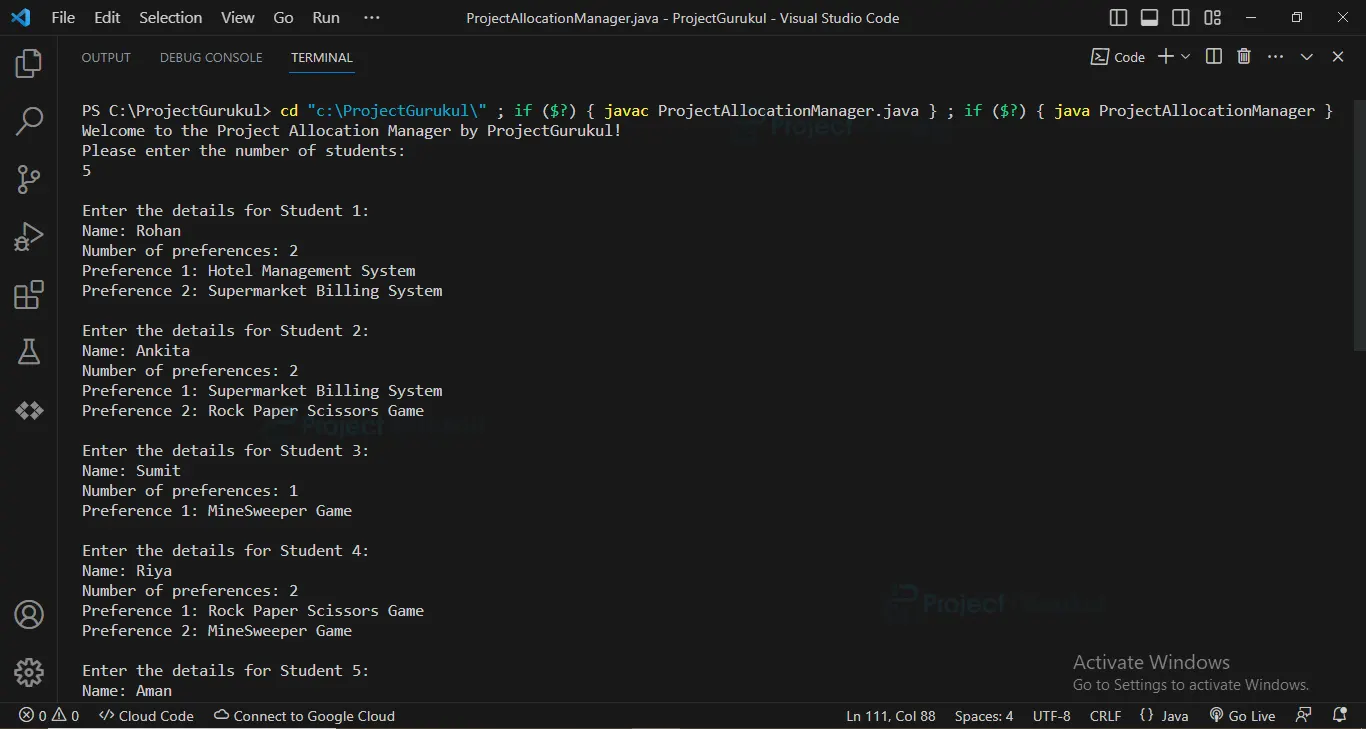
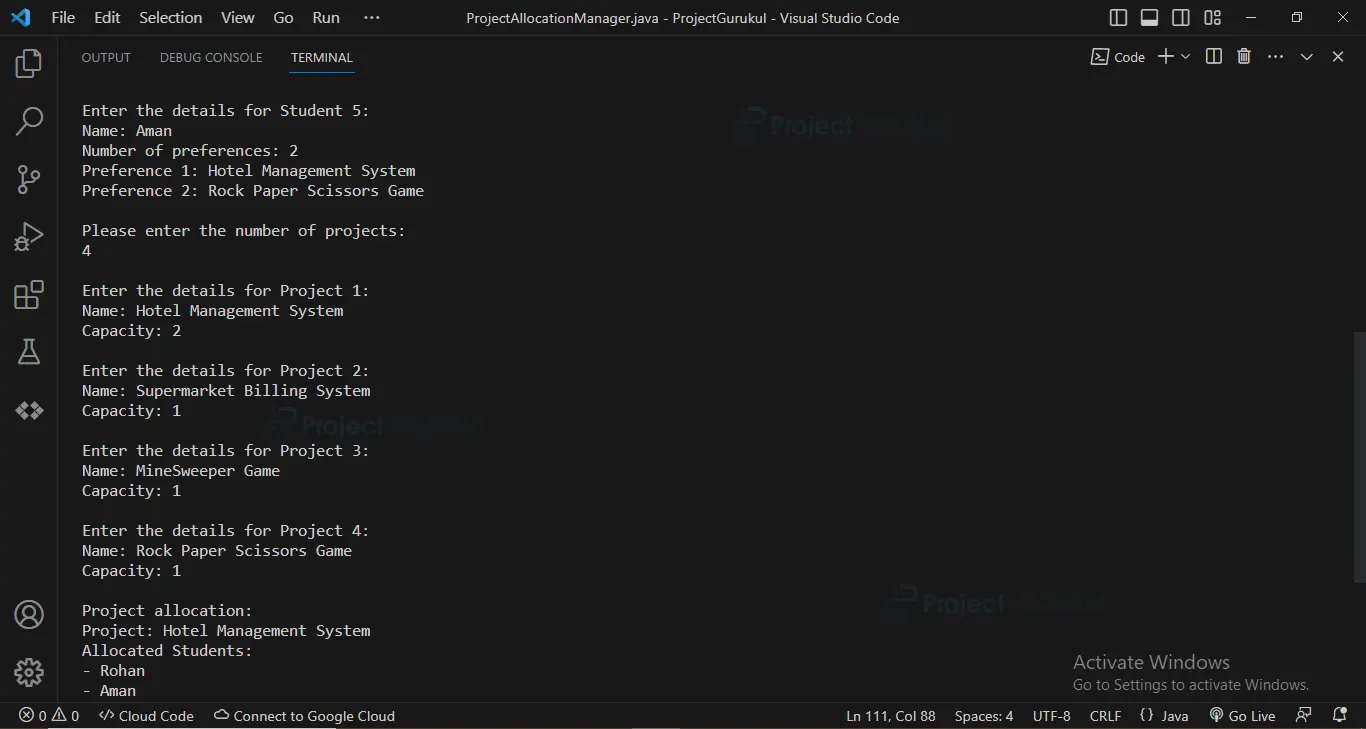
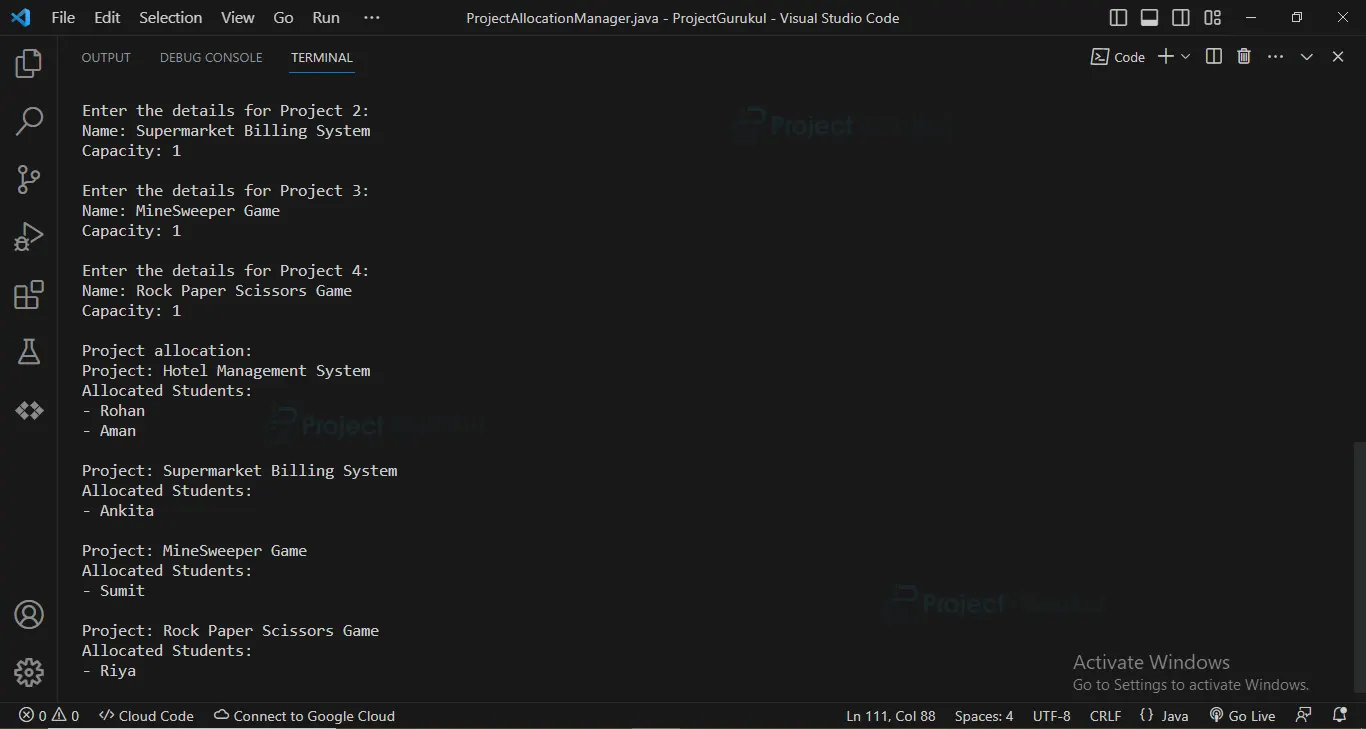
Java Student Project Allocation and Management Output
Summary
In conclusion, the Student Project Allocation and Management Project revolutionizes the allocation process, making it more efficient and transparent. Imagine students diving headfirst into projects that align perfectly with their interests and goals. They’ll be motivated, engaged, and ready to tackle any challenge that comes their way. This platform sets the stage for success in future endeavours, equipping students with the skills and knowledge they need to shine.
So, say goodbye to the headaches of project allocation and say hello to the Student Project Allocation and Management Project. The future of project allocation is here, and it’s simpler than ever!